
Blog
Can Magnetic Keyboard Switches Improve Your FPS Performance?
You’re settling in for a casual gaming session, ready to show off your skills in Valorant. But then it happens: you flick your cross-hair, spot an enemy, pull the trigger—only to be taken down first. You’re left wondering: your moves were spot on, so why did your reaction feel a split-second too slow? Checking the replay, you notice the opponent was a few frames ahead of you.
Many might blame their aim or reaction time, but have you ever considered that your keyboard switches could be the culprit? From the moment you press a key to the keyboard registering the input and sending it to the system, there are hidden layers of latency you might not even notice. This is precisely why magnetic keyboard switches have become a hot topic among competitive gamers. In this article, we’ll explore whether magnetic switches can actually improve your FPS performance by breaking down what they are, how they work, and the tangible differences they offer in-game.
What a Magnetic Keyboard Switch Is and How It Works
Unlike mechanical keyboard switches that rely on physical metal contacts, magnetic keyboard switches feature a magnet embedded at the base of the stem. A Hall-effect sensor on the keyboard’s PCB continuously monitors magnetic flux; as you press the key, the magnet moves closer to the sensor, increasing the flux. The keyboard’s firmware translates these readings into the real-time position of the stem. In other words, the system doesn’t just see a binary “pressed” or “not pressed” state—it knows exactly how deep the key is being pressed at any given moment.
Hall Sensing: Reading Position Continuously
This continuous tracking is the physical foundation for all the advantages offered by magnetic switches. Take the Polar Magnetic EVO switch, for example: it has an initial magnetic flux of 130±15Gs, reaching 600±60Gs at the bottom-out point (measured at a 1.6mm PCB distance). The sensor’s positional resolution is precise enough to detect travel distances at the 0.001mm level. Because the position is tracked continuously, the actuation point—the depth at which a key-press is registered—can be configured via software rather than being fixed at the factory. This provides a level of flexibility that traditional mechanical designs simply cannot match.
The Signal Chain From Press to Registration
Comparing the signal chains makes the difference clear. A traditional mechanical switch follows this sequence: press → physical contact closure → debounce period → registration. A magnetic switch, by contrast, follows: press → magnetic flux crosses a set threshold → registration—with no physical contacts involved. Magnetic flux design determines signal margin: the more robust the magnetic flux at the point of bottoming out, the less susceptible the signal is to interference from temperature drift or vibration. The so-called “reduction in perceived input latency” does not stem from faster sensing; rather, it results from fewer misinterpretations and retries, ensuring that every input detection is more accurate.
The Shortcomings of Mechanical Keyboard Switches
Contact Bounce and Debounce Delay
The moment metal contacts close, they bounce repeatedly for several milliseconds, causing the signal to flicker between “on” and “off” states. The controller must wait for this signal to stabilize before registering the key-press. While this delay lasts only a few milliseconds, it occurs with every single keystroke. Though barely noticeable during casual typing, it becomes significant in competitive gaming, where the frequency of key presses is far higher and immediate feedback is essential.
Fixed Actuation and Reset Points
The actuation distance of a mechanical keyboard switch is determined by its physical structure and cannot be adjusted after it leaves the factory. The same applies to the reset point: a key must travel back past a fixed reset point before it can be triggered again. In gaming—for instance, when executing a sudden stop or a change in direction—the key must complete the full cycle of “releasing past the reset point, then being pressed back to the actuation point,” which can disrupt the rhythm of gameplay.
Wear and Inconsistency Over Time
Metal contacts are subject to wear and oxidation. After millions of presses, contact resistance increases and the bouncing characteristics change. Consequently, the firmware’s “debounce” parameters must be set conservatively—based on a “worst-case scenario”—which further degrades the user experience. Furthermore, due to inherent variations between individual switches, the notion that “every key is exactly the same” remains, at best, a theoretical promise.
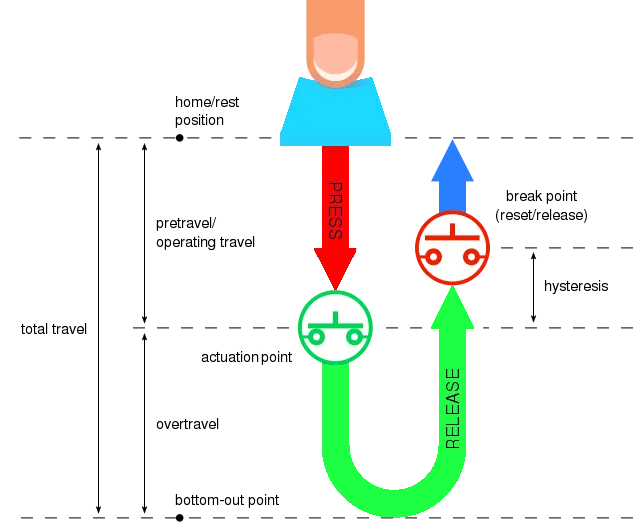
mechanical keyboard switch reset principle
How a Magnetic Keyboard Switch Improves FPS Performance
Adjustable Actuation for Movement Keys
Actuation distance can be customized with a precision of 0.001RT accuracy. Movement keys can be set to an ultra-short actuation distance, responding to the slightest touch for near-instantaneous movement. Conversely, ability keys can be set to a deeper actuation point, preventing accidental activation of “ultimate” abilities during intense combat. On the same keyboard, different keys can have entirely different actuation depths—offering true, granular customization.
Rapid Trigger and Faster Counter-Strafing
“Rapid Trigger” technology allows keys to reset the moment you lift your finger. The key state toggles instantly upon release, without needing to return to a fixed reset point. This is particularly advantageous for “counter-strafing” in games like Valorant: the rhythm of switching between ‘A’ and ‘D’ keys is dictated by your fingers rather than a mechanical reset threshold, allowing for more nuanced “jiggle peeks.” For players who rely on precise footwork to bait out enemy fire, this provides a direct and significant performance boost.
No Debounce, Less Perceived Latency
Because there is no physical contact, there is no “signal bounce,” eliminating the need for a software “debounce” delay. With ample magnetic flux margin, every input is registered with absolute certainty. In competitive gaming, a difference of just a few milliseconds can be decisive—often determining the outcome of a firefight.
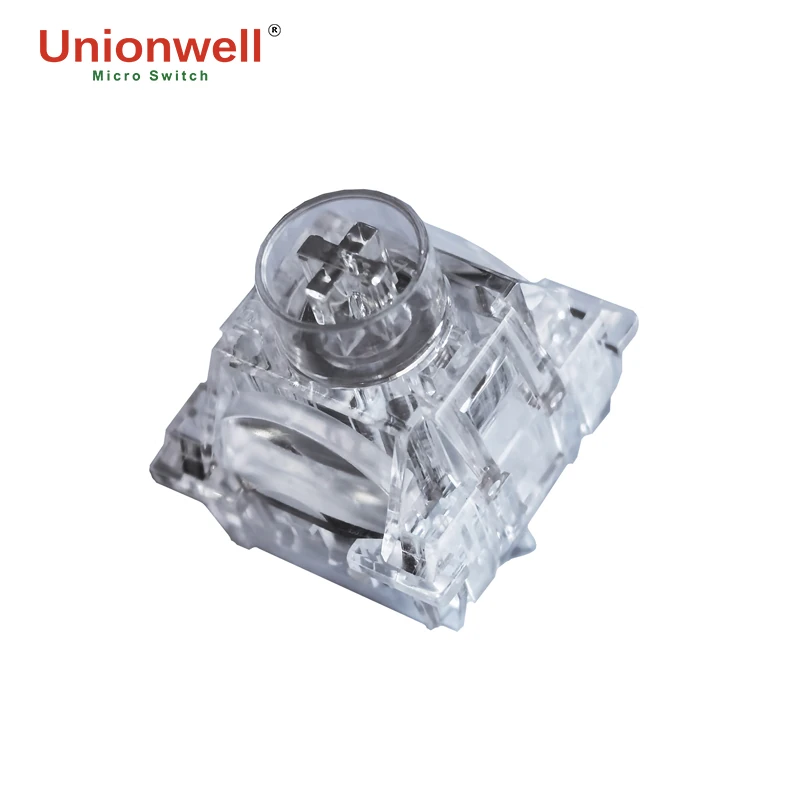
polar magnetic evo keyboard switch
100 Million Cycle Lifespan for High-Frequency Input
Competitive gaming involves a much higher frequency of key presses than everyday typing, requiring switches that offer both long-term durability and consistent tactile feel. Unionwell’s magnetic keyboard switches are rated for a 100-million-cycle lifespan. Their linear, non-tactile design ensures a smooth experience during rapid, repetitive keystrokes, preventing any “stickiness” or friction that might otherwise arise from complex internal structures during long gaming sessions.
Mechanical vs. Magnetic Keyboard Switches
|
Comparison Dimension |
Mechanical Keyboard Switch |
Magnetic Keyboard Switch |
Significance for FPS Performance |
|
Signal Generation Method |
Physical closure and conduction via metal contacts |
Continuous sensing of magnet position by Hall sensor |
The signal source dictates the upper limit of precision and versatility. |
|
Debounce Delay |
Contact bounce lasts several milliseconds; firmware must debounce before confirming input |
No physical contacts; debounce step is completely unnecessary |
Eliminates a fixed delay duration on every single keypress. |
|
Actuation Travel |
Fixed at factory (e.g., actuates at 2.0 mm out of 4.0 mm total travel) |
Software-customizable; finely adjustable down to 0.1 mm increments |
Movement keys can be set to ultra-short actuation for instant response. |
|
Reset Method |
Must return to a fixed reset point before re-triggering |
Resets instantly upon lifting finger (Rapid Trigger) |
The rhythm of counter-strapping and sudden stops is dictated directly by your finger. |
|
Long-Term Consistency |
Parameters drift over time due to contact wear and oxidation |
No mechanical wear points; 100+ million cycle mechanical lifespan |
Performance remains consistent even under high-intensity competitive use. |
|
High-Frequency Operation |
Rapid consecutive presses are easily limited by tactile structures and rebound rate |
Smooth, linear feel without tactile bumps for fluid, rapid actuation |
More stable and seamless performance during high-frequency button mashing. |
It is worth noting that mechanical keyboard switches still hold an advantage when it comes to the tactile “feel” of typing, sound profile, and the ability to swap springs. However, in competitive gaming scenarios—where “response certainty” is the top priority—mechanical switches fall slightly short.
What to Check Before You Upgrade
Before deciding to upgrade your keyboard, it is advisable to carefully review the specifications of the switches. Factors such as operating force, total travel distance, customizability of the actuation point, magnetic flux levels (at both the initial and bottom-out positions), spring length, the materials used for the stem and housing (which affect smoothness and sound), and the rated lifespan will all influence your overall experience.
Reference for Purchasing Magnetic Keyboard Switches
If you are unsure where to start, consider the Polar Magnetic EVO Keyboard Switch as a benchmark (featuring an operating force of 37±5gf, a bottom-out force of <85gf, a total travel distance of 3.20±0.10mm, a 23mm spring, and a housing and stem made entirely of polycarbonate).
Platform and Software Dependency
Furthermore, magnetic keyboard switches require a keyboard controller that supports Hall-effect sensing; they cannot simply be installed into a standard mechanical keyboard. Features like adjustable actuation and “rapid trigger” also rely on the quality of the manufacturer’s software drivers. Before swapping switches, ensure that you are prepared to switch to a magnetic keyboard.
An Honest Perspective
While these switches remove hardware-related bottlenecks, they won’t magically improve your aim. Shorter actuation distances and faster reset times must be paired with deliberate practice to actually translate into a higher win rate. Think of magnetic switches as an investment to “remove potential hindrances” rather than as a “cheat”—that is the most honest answer to whether they can truly improve your FPS performance.
FAQ
Q1: Will my FPS performance in games improve immediately after switching to magnetic keyboard switches?
A1: Not necessarily. These switches raise the “floor” of your input chain; the benefits only translate into better in-game performance when combined with your existing aiming skills and game sense. Think of it as “eliminating a bottleneck” rather than “gaining an extra advantage.”
Q2: How much “debouncing” latency do traditional mechanical switches actually introduce?
A2: Contact bounce itself lasts for a few milliseconds, but firmware adds a conservative “stabilization window” on top of that. The exact time varies by keyboard, but in scenarios involving rapid, repeated key presses, this latency can accumulate and become quite noticeable.
Q3: How short should I set the actuation distance?
A3: It varies from person to person, but here’s a good starting point: set movement keys to 0.2–0.5mm for near-instant response, and set critical ability keys to 2.0mm or more to prevent accidental presses. Use these as a baseline, play a few matches, and then fine-tune the settings to find what feels best for you.
Q4: What are the gaming benefits of a linear, non-tactile feel?
A4: Without the resistance of a tactile bump, your fingertip experiences a smooth, uninterrupted motion from the initial press to the bottom-out point. This allows for a more consistent rhythm during rapid, repetitive keystrokes and ensures that the key’s rebound speed isn’t hindered by a tactile bump.
Q5: Are the “initial” and “bottom-out” magnetic flux values important?
A5: Yes, they are. Magnetic flux serves as the “raw material” for the switch’s signal. Higher flux values provide the sensor with a greater margin for detection, making the switch less susceptible to interference from temperature changes or vibrations—it’s a key specification to look for when shopping.
Conclusion
In terms of actuation flexibility, reset speed, signal reliability, and durability, magnetic keyboard switches can genuinely enhance your performance in FPS games. These improvements are backed by clear physical mechanisms and translate into tangible, real-world advantages in titles like Valorant: more precise movement (strafing), more responsive directional changes, and greater accuracy in every single input.
It should be clarified, however, that this improves the lower bound of your input—not the upper bound; the upper limit still depends on your own practice or reaction time. Keep this in mind before purchasing keyboard switches from a keyboard switch factory, and weigh it carefully before deciding to upgrade, so that your expectations aren’t left unfulfilled.