
Blog
Factors to Consider When Choosing a Mechanical Keyboard Switch
For many newcomers or casual users, the first step in choosing a mechanical keyboard switch is looking at its color—red, black, brown, blue, and so on. Guided by common advice, they often assume that the color alone dictates the “feel” (tactile experience). In reality, color is merely a conventional industry label; even among switches labeled as “red,” differences in manufacturer, operating force, total travel distance, and other factors can lead to vastly different typing experiences.
Ultimately, what truly determines the feel and lifespan of a mechanical keyboard switch are the technical specifications—and how well those specifications align with your specific use case and personal typing habits. This article breaks down the selection process into five key areas: switch type (tactile/linear), force and travel, lifespan and materials, sound and environment, and hot-swappability and batch consistency. We will help you transform the abstract concept of “feel” into a concrete, itemized checklist.
Why the Name of a Mechanical Keyboard Switch Tells You Too Little
Colors and names are merely simplified classification labels; technical specifications serve as the “common language” between manufacturers and users. To interpret these specifications, you must first understand the “force-travel curve.” The horizontal axis represents the switch’s travel distance, while the vertical axis represents the operating force. Key metrics—such as the actuation point, tactile peak, reset point, and bottom-out force—are all mapped onto this curve. A smooth, rising curve indicates a linear feel, while a distinct bump signifies a tactile event. The degree of separation between the downward-press curve and the upward-rebound curve reflects the mechanical keyboard switch‘s hysteresis (the lag between actuation and reset).
Furthermore, even if two switches share nearly identical nominal specifications, differences in the shape of their force-travel curves will result in a different actual feel. It is also important to consider tolerances and testing conditions; a stated tolerance of ±5gf is a direct reflection of a manufacturer’s quality control standards. Before comparing specific technical parameters, always ensure that the manufacturers’ measurement conditions are consistent.
Factor 1: Hand Feel Type of the Mechanical
- Linear keyboard switches offer a smooth, consistent keystroke without any tactile bump or audible click. They are the quietest of the three types, making them ideal for FPS games that require rapid actuation and continuous input, as well as for shared office environments where noise must be kept to a minimum.
- Tactile keyboard switches feature a distinct “bump” or resistance point midway through the keypress. While they may still produce some sound, this tactile feedback serves as a “physical safeguard” against accidental key presses—a feature well-suited for typing, programming, and MMO games that involve frequent, multi-key inputs.
- Clicky keyboard switches are similar to tactile switches but add a crisp, audible “click” to the tactile bump. They provide the most immersive experience through both tactile and auditory feedback; however, they are best reserved for private spaces or dedicated typing tasks, as the noise can easily disturb others in an open environment.
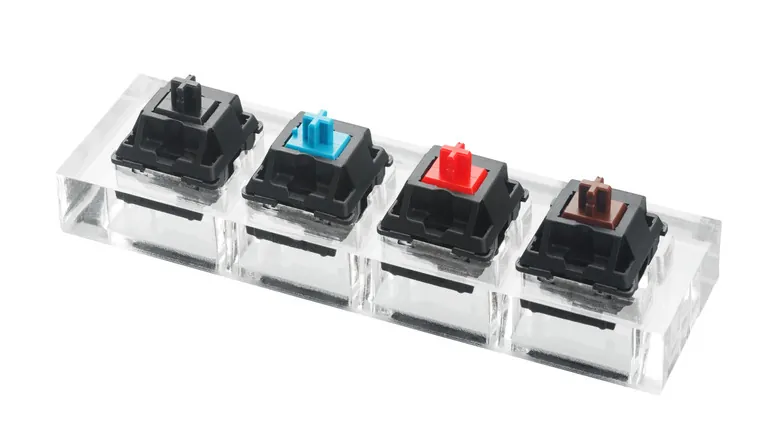
different types of mechanical keyboard switches
Factor 2: Force and Travel Numbers on the Datasheet
Actuation Force vs. Bottom-Out Force
Actuation force can be broadly categorized into three levels:
- 35–50gf (grams-force) is considered “light”—it requires very little effort to actuate, though it may be more prone to accidental key presses.
- 55–68gf is a “balanced” range; it requires a deliberate press without causing fatigue, making it the “sweet spot” for most users.
- 70gf and above is considered “heavy”—typing for extended periods with these switches can lead to noticeable fatigue.
It is also important to distinguish between actuation force and bottom-out force. Users who type with a light touch and rarely bottom out their keys should focus primarily on actuation force. Conversely, those who tend to press keys all the way down should pay closer attention to the bottom-out force (e.g., 45±10gf) as well as the difference between the actuation force and the bottom-out force—a smaller gap results in a gentler, less jarring impact when the key hits the bottom.
Pre-Travel, Total Travel, and the Reset Point
Pre-travel refers to the distance a key travels from its resting position to the actuation point; a shorter pre-travel distance allows for faster actuation. Total travel is the full distance from the resting position to the bottom of the keypress—typically 3.3–4.0mm for mechanical switches. A longer total travel distance provides a more substantial, “full” bottom-out feel, while a shorter distance requires less physical effort. The distance between the actuation point and the reset point determines the experience of rapid, repeated key presses: a shorter distance allows for a more responsive rhythm when releasing and re-pressing a key, with minimal lag.
Additionally, you can make a choice based on your hand size: if you have large hands and are prone to accidental key presses, opt for switches with a deeper actuation point (around 2mm) and a medium-to-heavy actuation force (55gf or greater). Conversely, if you prioritize response speed, you might choose keyboard switches with a shorter pre-travel distance—provided that the risk of accidental presses remains within an acceptable range for you.
Factor 3: Lifespan, Materials, and Sound
Mechanical Lifespan vs. Electrical Lifespan
Mechanical lifespan refers to the total number of physical actuations a switch can endure, while electrical lifespan refers to the number of cycles it can maintain reliable electrical contact—these two concepts should not be conflated. Keyboard circuits operate on low-level signals; if the electrical contacts oxidize, a switch that is still physically functional may begin to produce unstable signals. While the use of appropriate contact materials and surface treatments can enhance signal reliability, this does not equate to an extension of the switch’s mechanical lifespan.
Sound and the Working Environment
Sound is another critical factor. Clicky keyboard switches utilize a dedicated mechanism to produce sound, which is not solely dependent on the operating force. For linear and tactile switches, the “baseline” sound is determined by a combination of materials, springs, and internal structure. For instance, a POM stem offers smoothness and wear resistance, while a PC (polycarbonate) top housing provides light transmission and a “clean” sound profile; different combinations of these elements result in varying degrees of smoothness and distinct tonal characteristics. Springs in commercially available switches typically range from 14mm to 22mm in length, but factors such as wire gauge, number of coils, and pre-compression also influence the rebound feel—a longer spring does not necessarily mean a heavier actuation force.

When selecting keyboard switches based on sound, the primary rule is simple: for open-plan offices or late-night use, linear switches are the best choice (tactile switches are also an option). Clicky switches should generally be reserved for private spaces or environments like internet cafés.
Factor 4: Hot-Swappability, Consistency, and Sample Testing
Hot-swappability allows you to swap out mechanical switches on the same keyboard, enabling you to switch between different typing experiences—such as those tailored for office work or gaming—whenever you like. If you are unsure about your preferred feel but have an interest in DIY, this is the safest, most flexible approach.
If you are planning a bulk purchase or a large-scale build, be sure to include specifications regarding tolerances and batch-to-batch consistency. Ensuring that the actuation force and travel distance of every switch fall within a defined tolerance range is essential for a uniform typing experience across the entire keyboard. It is only prudent to proceed with a bulk order once you have verified that the actual performance data aligns with the manufacturer’s specifications.
Three Types of Keyboard Switches Compared
In addition to mechanical keyboard switches, there are magnetic keyboard switches, which use Hall-effect sensors to detect the position of a magnet within the switch stem. Their actuation points are defined via software and can be adjusted in 0.1mm increments; they also support “rapid trigger” functionality, making them ideal for competitive gamers who prioritize response speed. Inductive keyboard switches, meanwhile, use coils to detect the movement of metal components. Like magnetic switches, they are non-contact and unaffected by magnetic degradation, making them an excellent choice for typists as well. The table below presents these three types of switches side by side, offering a clear overview of the available options and their respective technical specifications.
|
Comparison Criteria |
Mechanical Keyboard Switch |
Magnetic Keyboard Switch |
Inductive Keyboard Switch |
|
Signal Source |
Physical contact between metal contacts to open and close the circuit |
Hall sensor detects the position of the magnet inside the stem, without physical contact |
Coil detects the position of a moving metal component, without physical contact |
|
Feel Types |
Available in linear, tactile, and clicky configurations |
Primarily linear |
Primarily linear |
|
Actuation Point |
Fixed at the factory |
Software-adjustable; supports Rapid Trigger |
Software-adjustable |
|
Operating Force / Total Travel |
35–70 gf; total travel: 3.3–4.0 mm |
Commonly 35 ± 5 gf; total travel: approximately 3.2 mm |
Commonly 30/40 gf; total travel: approximately 3.0–4.0 mm |
|
Spring Specifications |
Commonly 14–22 mm |
Extended springs: 21–23 mm |
Configured according to the specific model |
|
Best Suited For |
Typing enthusiasts, MMO players, and users who prioritize typing feel |
Competitive FPS players |
Users who prioritize long-term signal stability |
FAQ
Q1: Why does the specification sheet list a range like ±5gf instead of a single, precise number?
A1: Keyboard switches naturally have manufacturing tolerances—variations in spring wire diameter and the number of coils, differences in assembly height, and positioning variances in measurement fixtures all play a role. This type of specification reflects both transparency and quality control standards; a narrower tolerance range ensures greater consistency in the “feel” of individual switches across a full batch.
Q2: Does a longer spring always mean a stiffer keyboard switch?
A2: Not necessarily. The stiffness of a spring is determined by a combination of wire diameter, the number of coils, and its effective length. Length is just one variable; to truly understand the feel, you must look at the entire force-travel curve rather than focusing on length alone.
Q3: Is a lighter actuation force always better?
A3: Not necessarily. Switches with a light actuation force (35–50gf) are effortless and responsive, but users with larger hands or a heavier typing style may find them prone to accidental key presses. A medium range (55–68gf) suits most people, while switches requiring over 70gf can lead to fatigue during long typing sessions. It is always more reliable to test them yourself rather than relying solely on recommendations.
Q4: What primarily determines the volume of the “click” sound?
A4: It is mainly produced by the internal click mechanism and is not necessarily linked to the actuation force. Even among tactile (clicky) switches, different material combinations result in distinct sound profiles; it is best to evaluate your choice by listening to sound samples.
Q5: How can I determine if a switch’s specifications meet my requirements?
A5: Start by reviewing key parameters: actuation force and tolerance range, total travel and pre-travel, rated lifespan (and the conditions under which it was tested), and material composition. Finally, verify the switch by testing a sample against its force-travel curve.
Conclusion
When selecting the ideal mechanical keyboard switch, the color and name are merely the starting point. The key factors to consider are: the intended use case (for the overall feel), your personal typing habits (for force and travel distance), the intensity of use (for lifespan), and your working environment (for sound). Ultimately, ensure quality by checking the tolerance range and the consistency across production batches.
Furthermore, the force-travel curve, parameter tolerances, and test conditions serve as the true benchmarks for evaluation. By analyzing these curves, reviewing the tolerances, and verifying the test conditions, “feel” ceases to be some mysterious, subjective quality—it becomes a concrete set of specifications that you can clearly define and confirm with your keyboard switch supplier.