
Blog
Keyboard Switch Comparison: Mechanical, Inductive and Magnetic Keyboard Switch
The keyboard switch is the core component responsible for detecting keystrokes. It not only influences the typing feel, actuation speed, and sound but also determines whether the keyboard can support features such as continuous displacement detection, adjustable actuation points, and Rapid Trigger functionality.
Mechanical keyboard switches primarily rely on physical contacts to trigger signals; magnetic keyboard switches detect key position via magnetic field changes; and inductive keyboard switches utilize inductance or electromagnetic induction to track the movement of the switch stem. This article compares these three types of keyboard switches—covering their working principles, structure, detection methods, typing feel, response speed, durability, and application scenarios—to help you understand the characteristics of each technology.
What Is a Keyboard Switch and Why Does Technology Matter?
The Basic Functions of a Keyboard Switch
Installed between the keycap and the PCB, the keyboard switch converts the user’s pressing force into electronic input signals that the PCB can recognize. When a user presses the keycap, the switch stem moves along a guide structure; a spring provides restoring force, and the detection mechanism generates a corresponding signal based on the stem’s position. Upon receiving the signal, the keyboard’s micro-controller determines the key’s state and executes the appropriate action.
It performs three core tasks: receiving pressing force, executing mechanical movement, and transmitting key state or position information to the control system. Different technologies influence the actuation method, operating force, actuation distance, sound profile, input response speed, mechanical lifespan, and more. Furthermore, the design of the keyboard switch not only dictates the typing feel but also directly impacts the keyboard’s potential for expanded functionality.
From Mechanical Contact to Non-Contact Keyboard Switch Technology
Mechanical keyboard switches primarily alter the circuit state through the contact or separation of physical points or metal leaves. Once the switch stem moves to a specific position, the contacts close or open, allowing the keyboard’s micro-controller to register the input.
In contrast, magnetic and inductive keyboard switches employ non-contact detection technologies. While all three technologies facilitate keyboard input, their differing detection mechanisms result in variations regarding actuation methods, displacement tracking, and functional capabilities.
How Does a Mechanical Keyboard Switch Work?
A mechanical keyboard switch typically consists of a stem, a spring, a housing, metal contacts, and a guiding structure. When a user presses the keycap, the stem moves downward, actuating the internal contacts and changing the circuit state at a specific position.
Mechanical Contact and Physical Actuation
Mechanical keyboard switches trigger signals through physical contact. As the stem is pressed, it moves a movable contact or metal leaf, causing it to engage with or disengage from a stationary contact. When the contact state changes, the circuit connects or disconnects, allowing the keyboard’s controller to register the keystroke.
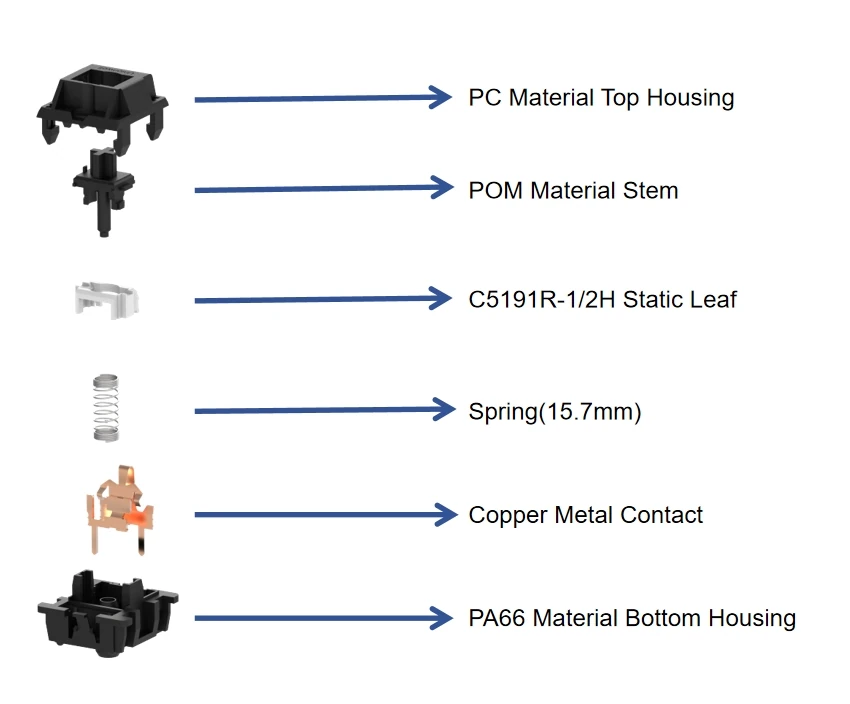
mechanical keyboard switch structure
Mechanical Keyboard Switch Feel and Feedback
The tactile feel of a mechanical keyboard switch is primarily determined by the stem structure, spring specifications, guiding mechanism, and contact movement. Linear switches offer smooth, consistent resistance without distinct tactile feedback; tactile switches provide a noticeable change in resistance during the press, allowing the user to sense the actuation point; and clicky switches utilize a mechanical mechanism to deliver both audible clicks and distinct tactile feedback.
Variations in spring force affect actuation weight, return speed, and the overall typing experience during extended use. Consequently, mechanical keyboard switches offer a wide range of tactile profiles to suit different typing preferences.
Advantages and Limitations of Mechanical Keyboard Switches
The primary advantages of mechanical keyboard switches include their mature design, diverse tactile options, and a well-established product ecosystem, as well as high compatibility with keycaps, PCBs, and control systems.
Their limitations stem largely from the physical contact mechanism; long-term use leads to wear, and the fixed mechanical actuation point limits the ability to adjust actuation settings via software. Furthermore, mechanical switches output discrete on/off states, making it difficult to directly provide continuous displacement data. For applications requiring real-time position detection—such as adjustable actuation—alternative sensing technologies are recommended.
How Does a Magnetic Keyboard Switch Work?
Magnetic keyboard switches detect key displacement by monitoring the changing relative position between a magnet and a Hall effect sensor. When a user presses the keycap, the magnet moves along with the switch stem; the Hall sensor detects changes in magnetic field strength or direction and converts them into electrical signals, allowing the keyboard’s control system to determine the stem’s position and the key’s status.
The Role of Magnets and Hall Sensors in a Magnetic Keyboard Switch
In a magnetic keyboard switch, the magnet is typically mounted within the stem or a moving module, while the Hall sensor is positioned on the PCB directly beneath it. When the switch is at rest, the magnet maintains a specific distance from the sensor. Upon key actuation, the magnet moves in a predetermined direction, altering the magnetic field detected by the sensor. The control system analyzes these magnetic field signals to determine the stem’s position throughout its movement.

magnetic keyboard switches
Continuous Travel Detection in a Magnetic Keyboard Switch
A key feature of magnetic keyboard switches is their ability to track the stem’s position throughout its entire travel range, rather than simply registering an “actuated” or “unactuated” state. This capability for continuous displacement detection enables flexible input logic, such as adjustable actuation points and “Rapid Trigger” functionality.
Users can configure actuation points via software, tailoring key parameters to personal preferences or specific applications. In competitive gaming scenarios requiring rapid, repetitive inputs, continuous displacement data allows the system to detect key presses and releases with greater speed and precision.
Mechanical Structure and Signal Stability
The performance of a magnetic keyboard switch depends not only on the magnet and Hall sensor but also on the switch’s mechanical structure. Factors such as stem wobble, magnet misalignment, spring characteristics, tolerances in the guiding structure, and assembly precision can all affect the consistency of magnetic field changes. If the magnet’s movement path is unstable, the signal captured by the sensor may become inconsistent or inaccurate.
Unionwell’s Polar Magnetic Keyboard Switch addresses these issues through designs such as a “Dual-Body Floating Structure” and a “Ball-and-Socket Joint.” These features help maintain consistent relative positioning between the magnet and the Hall sensor, thereby enhancing the stability of continuous displacement detection. For more details on these optimizations, please refer to the article 《How does a dual-body floating structure improve a magnetic keyboard switch》.
How Does an Inductive Keyboard Switch Work?
Inductive keyboard switches detect the position of the switch stem through changes in inductance or electromagnetic induction; like other non-contact technologies, they do not rely on physical electrical contacts to register input. As the stem moves, the relative position between an aluminum rod and an induction coil shifts, altering the circuit’s inductance parameters or electromagnetic response. The control system analyzes these changes to determine the key’s state or displacement.
Inductive Sensing Instead of Mechanical Contact
Inductive keyboard switches eliminate the need for metal contacts, instead utilizing the movement of a conductive component within an electromagnetic field to alter the induction coil’s parameters. In this design, the induction coil is located on the PCB or electronic circuit assembly, while the aluminum rod is housed within the switch stem. As the rod moves closer to or further from the coil, the electromagnetic coupling changes, allowing the control circuit to identify the stem’s position. Because detection does not rely on contact closure, inductive switches mitigate issues such as contact wear, oxidation, and inconsistent contact performance.
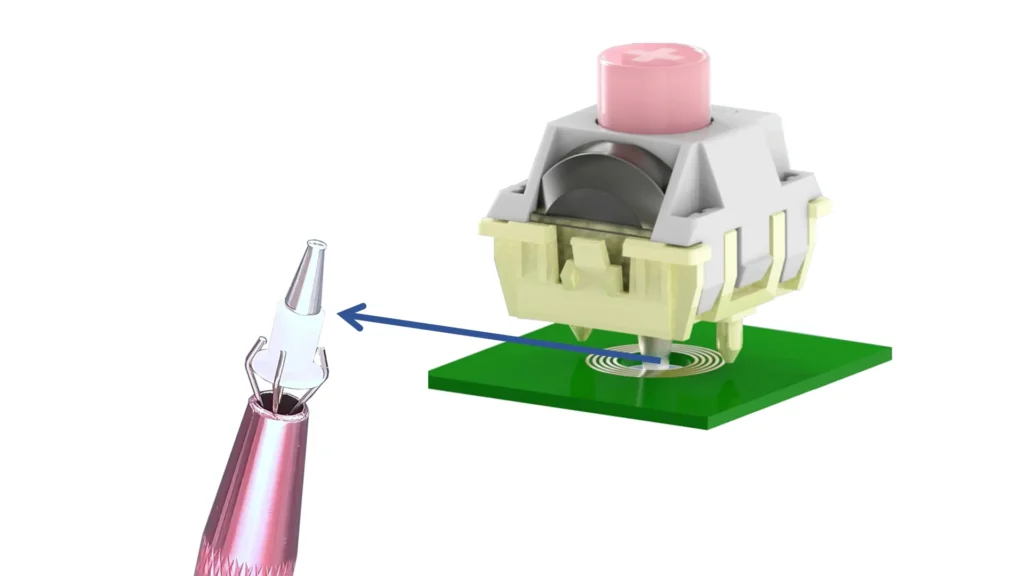
the metal rod inside the inductive keyboard switch
Position Detection and Signal Processing
Inductive keyboard switches determine the stem’s movement state by processing the sensed signals. Their performance depends on factors such as the induction coil design, the material and shape of the conductive component, and the processing capabilities of the electronic circuitry.
Although both inductive and magnetic keyboard switches employ non-contact detection, their operating mechanisms differ significantly: magnetic switches rely on changes in a magnetic field, whereas inductive switches rely on the electromagnetic interaction between a coil and a conductive component.
Potential Applications of Inductive Keyboard Switches
While the market ecosystem for inductive keyboard switches is still evolving, their low-power, non-contact detection method holds potential value for high-reliability input devices and next-generation keyboards. Inductive switches offer a promising new technical direction for products that prioritize mechanical longevity, low maintenance requirements, and precise displacement detection.
However, this solution requires specialized sensing circuitry and signal processing systems, resulting in somewhat higher development costs; successful implementation also requires careful coordination between the switch stem, PCB, controller, and software.
Mechanical vs. Magnetic vs. Inductive Keyboard Switches: Key Differences
Comparison of Actuation Principles
The three types of keyboard switches operate based on different actuation principles:
- Mechanical keyboard switches generate signals through the contact and separation of mechanical points or metal leaves.
- Magnetic keyboard switches detect input by monitoring changes in the magnetic field between a magnet and a Hall effect sensor.
- Inductive keyboard switches identify displacement by sensing changes in inductance or electromagnetic response between a coil and a moving conductive component.
Their underlying detection mechanisms dictate the differences in signal characteristics, structural design, and functional capabilities.
Comparison of Contact vs. Non-Contact Detection
Mechanical keyboard switches utilize a contact-based detection structure; since the contacts must repeatedly engage and disengage, long-term stability depends on factors such as contact materials, contact pressure, and mechanical design.
Magnetic and inductive keyboard switches do not require direct electrical contact, thereby minimizing issues like wear, oxidation, and inconsistent contact performance.
However, non-contact detection relies on high-precision mechanical engineering. Magnetic switches require a stable movement path for the magnet, while inductive switches necessitate precise control over the relative positioning of the conductive component and the sensing coil. Ultimate performance is determined by the combination of mechanical precision and electronic detection accuracy.
Comparison of Travel Detection Capabilities
Mechanical keyboard switches operate based on a fixed actuation point; once the switch stem moves to a preset position, the contact state changes, and the keyboard controller registers the input.
Magnetic keyboard switches use Hall effect sensors to monitor magnetic field changes, providing continuous displacement data throughout the switch’s travel. Inductive keyboard switches detect continuous displacement via electromagnetic induction signals.
Continuous travel detection is the foundation for features like Adjustable Actuation and Rapid Trigger. Only by obtaining stable positional data can the system dynamically adjust the input state in response to pressing and releasing actions.
Which Keyboard Switch Is Suitable for Different Applications?
Mechanical Keyboard Switches for Office and Custom Keyboards
Mechanical keyboard switches are suitable for office keyboards, custom keyboards, standard mechanical keyboards, and various general-purpose input devices. They offer a stable typing experience for text entry, daily office tasks, and applications requiring distinct tactile feedback. Users of custom keyboards can also select from linear, tactile, or clicky switch types based on personal preference.

Magnetic Keyboard Switches for Gaming Keyboards
The value of magnetic keyboard switches lies primarily in their ability to detect continuous displacement. They support features like “Rapid Trigger,” allowing keys to quickly reset to an active state during the upstroke—ideal for gaming scenarios requiring rapid, continuous inputs and frequent changes in direction.
Additionally, magnetic switches support features such as adjustable actuation; users can customize the actuation point via software or utilize continuous displacement data to achieve more complex input controls.
Inductive Keyboard Switches for Specialized Input Systems
Inductive keyboard switches are well-suited for professional control devices, innovative keyboard designs, and high-reliability input systems that explore new input methods. Their low-power, non-contact detection method eliminates limitations associated with mechanical contacts and offers a new technical pathway for precise displacement detection.
However, implementing inductive switches requires evaluating factors such as induction coils, conductive components, PCB layout, electronic control schemes, and software processing capabilities. As the ecosystem for this technology is still evolving, product development typically requires extensive system-level validation.
Conclusion
While mechanical, magnetic, and inductive keyboard switches all facilitate keyboard input, their detection mechanisms differ significantly: mechanical switches generate discrete signals through the physical contact and separation of metal points; magnetic switches achieve non-contact detection by sensing magnetic field changes between a magnet and a Hall-effect sensor; and inductive switches identify switch position by utilizing the electromagnetic response between an induction coil and a conductive component.
Therefore, when selecting keyboard switches from the keyboard switch manufacturer, one should not focus solely on the actuation principle. Factors such as mechanical structure, signal stability, typing feel, lifespan, control systems, software functionality, manufacturing capabilities, and customization needs must all be considered. Understanding the differences between these three technologies helps in selecting the right switch for specific applications.