
Blog
Magnetic Keyboard Switch for Office Work: Comfort, Precision and Longevity
When “magnetic keyboard switches” are mentioned, most people’s first thought is gaming—shorter actuation distances, faster response times, and a more responsive, fluid experience for competitive play. However, if you ask a programmer or a writer—someone who spends hours at a keyboard every day—what makes a keyboard “good,” their criteria would be entirely different: Will my fingers get tired after long periods of typing? Are there accidental keystrokes from light, unintentional touches? Is the feel consistent across every key?
Interestingly, the core characteristics of magnetic keyboard switches—non-contact sensing, adjustable actuation points, a light, linear feel, and uniform, vibrant lighting—align perfectly with the needs of office work and programming. In other words, they can serve as excellent “productivity tools” for drafting documents or debugging code. This article explores the underlying technology, using the Polar magnetic keyboard switch as a case study to examine its tactile characteristics and lighting design, providing a clear picture of what it’s actually like to use magnetic switches in an office environment.
What Is a Magnetic Keyboard Switch?
Hall Effect Sensing Instead of Physical Contact
Unlike mechanical keyboard switches, which rely on the physical contact of metal points to complete a circuit, magnetic keyboard switches utilize the Hall effect. A magnet (such as a high-grade N52 magnet) is embedded within the switch, while a Hall sensor on the PCB monitors changes in magnetic flux in real-time, allowing the controller to determine whether a key has been actuated. Taking the dawn light magnetic keyboard switch as an example: the initial magnetic flux at the PCB is approximately 90±15Gs, increasing to about 480±60Gs at the bottom-out point, with signal consistency reaching the RT 0.001 level.
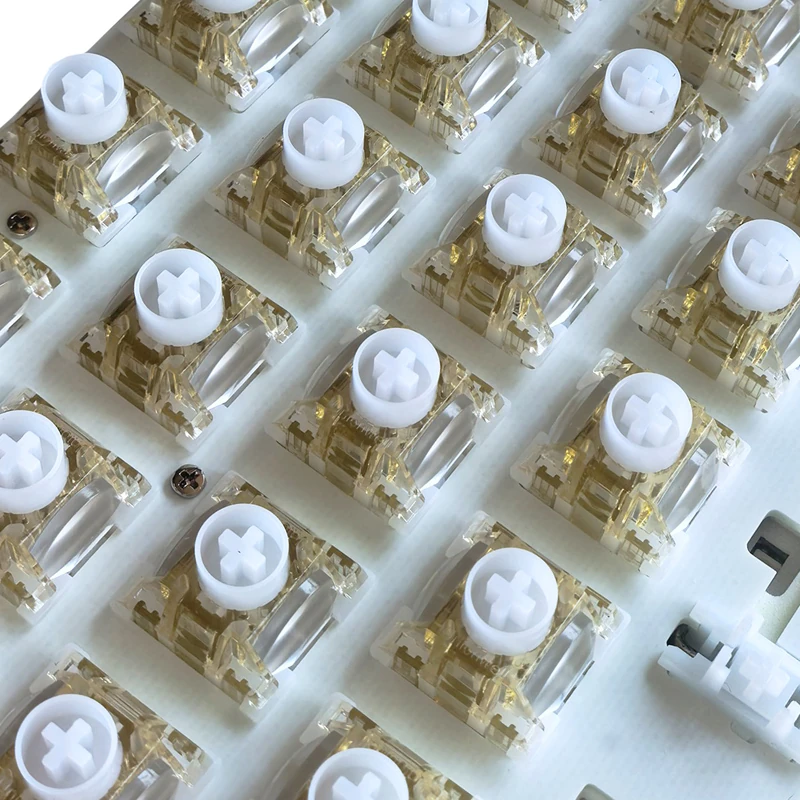
polar magnetic dawn light keyboard switch
Because there are no physical contact points, the actuation distance can be fully customized—you can set the trigger point to 0.8mm, 2.0mm, or any other value. Furthermore, the absence of physical contact points eliminates wear and tear, resulting in a mechanical lifespan that can exceed 100 million actuations.
From Gaming Hardware to Everyday Tools
Magnetic keyboard switches were indeed originally designed with competitive gaming in mind: a shallow actuation point enables faster responses, while “Rapid Trigger” functionality ensures that a key resets the moment it is released. However, these same characteristics also address common challenges in text-heavy work: adjustable actuation points mean that accidental key presses can be “tuned out”; a light actuation force makes long-duration typing less fatiguing; and an exceptionally long lifespan provides ample durability, even under the heavy, frequent keystrokes typical of intensive use. An increasing number of office professionals and programmers are adopting magnetic-switch keyboards as their primary input devices—signaling a shift for this technology from a niche gaming peripheral to a practical tool for the workplace.
Why Office and Programming Users Are Turning to Magnetic Keyboard Switches
The requirements for keyboards in office and programming contexts can be summarized into four key areas: fatigue management during long sessions, typing accuracy, a quiet and focused environment, and a stable, consistent tactile feel. Magnetic keyboard switches offer specific advantages in each of these areas.
Long Typing Sessions Demand a Gentler Touch
For programmers, it is not uncommon to perform tens of thousands of keystrokes in a single day. Take the Ice Shine keyboard switch, for example: it features an operating force of 35±5gf, a bottom-out force of 45±10gf, and a total travel pressure of less than 85gf—a design characterized by a light touch. This means less effort is required for each keystroke, significantly reducing fingertip soreness and fatigue during extended periods of typing. Furthermore, a lighter actuation force makes it easier to maintain a steady typing rhythm, as there is no need to press down with excessive force just to ensure the key registers. Over the course of a multi-hour work session, this difference in required effort becomes truly noticeable.
Adjustable Actuation for Fewer Typos
Adjustable actuation is perhaps the most practical feature of magnetic switches for office users. You can set a deeper actuation point (e.g., around 2.0mm) for the main typing area, which prevents accidental inputs caused by resting your palms or lightly brushing against the keys—effectively reducing extra or incorrect characters in your documents. Meanwhile, for frequently used keys like Esc, Ctrl, and Shift, you can set a shallower actuation point (e.g., 0.8mm) to make key combinations feel more responsive and intuitive. Using the accompanying software, you can configure the actuation point for every individual key, ensuring that deeper actuation is applied where precision is paramount.
The Linear Keyboard Switch Feel: Why It Works for Typing
Most mainstream magnetic switches today feature a “linear” feel—a smooth, straight-down motion with no tactile bump or resistance point. This seemingly “neutral” or “characterless” feel is, in fact, exceptionally well-suited for typing.
Smooth Travel Without a Tactile Bump
Linear switches offer a consistently smooth keystroke with continuous feedback, free from the interruptions of a tactile bump. This allows users to establish a steady, reliable typing rhythm. When paired with extended springs (21mm or 23mm), the switches provide a crisp, snappy rebound; the keys return to their resting position so quickly that there’s no need to wait for them, allowing for fluid, uninterrupted typing of long sentences. For writers who rely on a steady rhythm, or programmers who frequently use the number pad, this “smoothness” translates directly into greater efficiency.
Light Operating Force and Fatigue Control
The combination of a light operating force and high-quality materials further enhances the advantages of a linear feel. The self-lubricating, wear-resistant POM stem—paired with a POM-cushioned bottom housing—ensures a light initial press and a soft bottom-out, minimizing strain during extended typing sessions. The sound profile is “thocky”—rounded, deep, and pleasant rather than sharp or harsh—ensuring the keyboard doesn’t become a source of noise in environments that require deep focus. Together, these features make magnetic switches an excellent choice for long hours of office work.
Dual-Light Keyboard Switches: Lighting Effects Beyond Aesthetics
Independent Dual Crescent-Shaped Light Guides
Unlike single-light switches, dual-light keyboard switches utilize two independent, crescent-shaped light guides. Combined with a highly transparent polycarbonate top housing, these guides provide superior light concentration and more uniform RGB brightness, resulting in significantly better light consistency across the legends on the key-caps. For instance, the “Dawn Light” switch features a golden-yellow transparent top housing with a white bottom housing, while the “Dusk Light” switch uses a purple transparent top housing with a creamy-white bottom housing; despite their different color schemes, both excel in providing uniform light distribution.
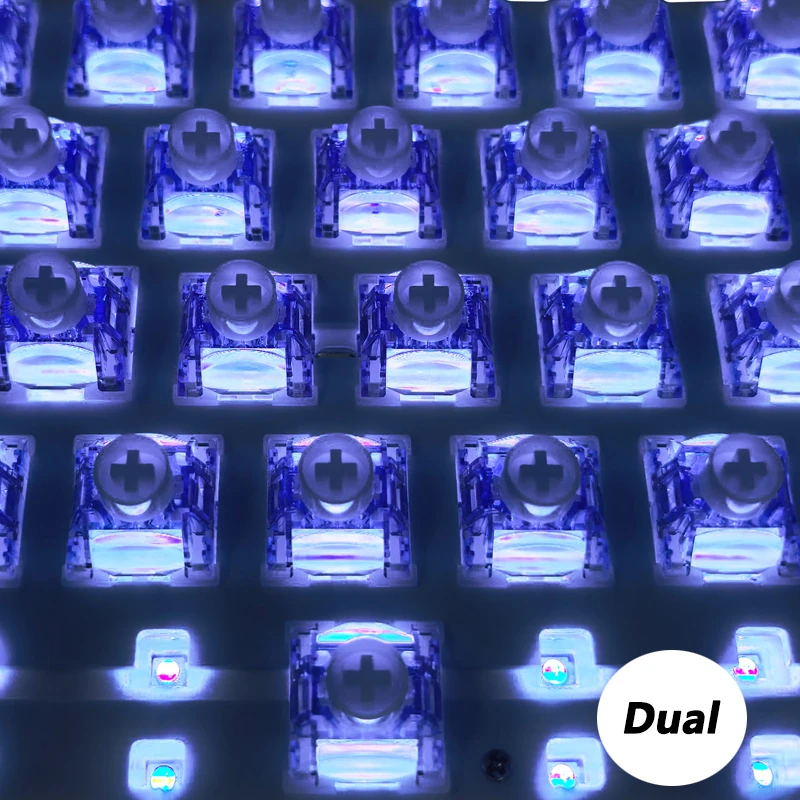
dual light keyboard switch lighting effect
A Calmer Desk Lighting Experience for Work
For office users, the true value of lighting effects lies in their “controllability.” During the day, the backlight can be set to a single, low-brightness color to serve as a status indicator—for instance, changing the keyboard’s color when “Do Not Disturb” mode is enabled, signaling to colleagues that you are currently occupied. For nighttime programming, a uniform, low-intensity glow provides sufficient visibility of the keys without being harsh or glaring in a dark environment. The dual-optical-switch design offers a genuine enhancement to your workspace through lighting that is uniform, soft, and fully controllable—far superior to the indiscriminate, flashy RGB effects often seen elsewhere.
Practical Experience in Real-World Office and Programming Scenarios
Writing and Documentation
Long-form writing is the ultimate test of a keyboard’s “endurance.” A light, linear feel combined with a deeper actuation point ensures that fingers remain relaxed even after hours of continuous typing. The consistent, stable actuation point fosters more reliable muscle memory, leading to fewer typos and less frequent use of the backspace key. For writers, the keyboard’s “presence” fades into the background, allowing them to remain fully focused on their content.
Coding, Shortcuts, and Key Remapping
Programming involves a high frequency of special symbols and function keys. By setting a shallower actuation point for keys like parentheses, quotation marks, Ctrl, and Shift, key combinations feel significantly more responsive and intuitive. Through driver-based per-key travel configuration, specific frequently used keys can even be assigned dual-layer functions. Furthermore, the 0.001-level signal consistency of Rapid Trigger (RT) technology ensures that rapid, repeated keystrokes are registered accurately—without missed inputs or unintended double-presses—which is especially noticeable during tasks like bulk deletion or batch indentation.
Meetings and Shared Work–spaces
In meeting rooms or open-plan offices, noise is a sensitive issue. Thanks to the POM bottom-out material and a “Dual-Module Independent” structural design, keystrokes produce a soft, muted sound with zero stem wobble—a much better fit for shared spaces than the sharp, “clicky” sound of tactile switches. By setting the back-lighting to a low-brightness, single-color mode, the keyboard’s visual footprint on a conference table can be minimized even further.
How to Choose a Magnetic Keyboard Switch for Work Use
Operating Force, Travel, and Actuation Settings
For operating force, a range of 30–40gf is recommended, as it is more comfortable for extended typing sessions. A total travel distance of 3.20 ± 0.10mm is the industry standard, offering a balance between efficiency and control. Ensure the switches support custom actuation and per-key configuration—this is essential for the utility of magnetic switches in a professional environment. Additionally, pay attention to the initial and bottom-out magnetic flux, as well as Rapid Trigger (RT) precision; these factors directly determine signal stability and consistency.
Materials, Sound, and Durability
Regarding materials, if you prefer a smoother feel, opt for components like a POM stem and bottom housing—these are self-lubricating and produce a clean sound. If you also value lighting aesthetics, a highly transparent PC top housing will ensure uniform light diffusion.
Furthermore, the use of N52 high-grade magnets and 21mm extended springs enhances the consistency of the rebound. With a mechanical lifespan exceeding 100 million actuations and an operating temperature range of -40°C to +80°C, these switches are more than capable of withstanding years of heavy office use. Finally, choose a keyboard switch manufacturer with a robust quality control system and high batch-to-batch consistency to ensure that the actuation characteristics and sound profile remain uniform across different sets of switches.
Conclusion
When viewed through the lens of professional work and programming, the value of magnetic keyboard switches becomes clear and tangible: non-contact Hall-effect sensing provides stable, consistent signals; adjustable actuation points significantly reduce accidental keystrokes; a light, linear feel ensures comfort even through tens of thousands of daily keystrokes; and uniform, vibrant lighting enhances your desktop atmosphere while being easier on the eyes during late-night work. These switches are far more than just tools for gaming.
If you are planning to upgrade your keyboard for work, consider looking for a model that offers a light, linear feel, adjustable actuation, uniform lighting, and a long lifespan. Evaluate your options based on operating force, travel distance, materials, and the manufacturer’s quality control. By incorporating magnetic switches into your workspace, you can make your daily hours of typing less strenuous, more focused, and significantly more comfortable.