
Blog
Mechanical Keyboard Switch Testing Guide for Beginners
With the increasing popularity of hot-swappable keyboards, more and more users are paying attention to the actual performance of mechanical keyboard switches. Whether you’re preparing to buy new switches or trying a custom keyboard, testing the keyboard switch beforehand is an important step. For beginners, everyone’s typing habits, usage scenarios, and tactile preferences are different, and relying solely on online reviews or recommendations may not be enough to find the right switches for you.
Testing a mechanical keyboard switch is much more than simply pressing a few keys; it’s a comprehensive process of understanding switch performance. This article will introduce the purpose of mechanical keyboard switch testing, common testing tools, specific testing methods, and comparison methods between different switches to help beginners establish a complete testing approach and make more informed choices when purchasing or replacing a keyboard switch.
Why Keyboard Switch Testing Is Important
Many users believe that simply looking at product specifications, such as Operating Force, Total Travel, and Mechanical Lifespan, is enough to judge whether a keyboard switch is excellent. In reality, while these parameters reflect the basic performance of the switches, they cannot fully represent the actual typing experience. The actual user experience of a mechanical keyboard switch depends on several factors, including smoothness, actuation stability, rebound speed, and sound performance. Accurate judgment requires actual testing.

typing keyboard
For users planning to buy or replace switches, testing beforehand not only reduces trial-and-error costs but also provides a clear understanding of these aspects:
- Typing Feel: Is the overall keystroke feel natural and stable, with consistent and comfortable feedback?
- Smoothness: Test the smoothness of the switch; less friction makes continuous typing easier.
- Actuation Consistency: Check if the actuation point and operating force are consistent, minimizing differences in feel between different keys.
- Return Performance: Observe the rebound speed and stability to ensure rapid response during high-speed typing.
- Sound Profile: Test the key sounds according to personal preference and choose a sound profile that suits you.
Furthermore, testing allows for a direct comparison of the actual performance of different mechanical keyboard switches. Even with similar specifications, different products can offer significantly different typing experiences due to differences in structure, materials, and manufacturing processes. Therefore, the real value of testing lies in helping users make judgments based on their own usage needs, rather than relying entirely on product parameters or online reviews.
Tools for Mechanical Keyboard Switch Testing
Preparing the right tools before formally testing a mechanical keyboard switch can improve testing efficiency and make the results more accurate. For most beginners, the following basic tools are sufficient for their main experience needs.
Keyboard Switch Tester
A keyboard switch tester is currently the most common tool for testing mechanical keyboard switches. It can be used with different switches to easily compare the differences in feel. Common types include single-switch testers, multi-switch testers, and custom test boards. Multi-switch testers are more suitable for beginners, allowing them to experience keyboard switches of different brands, structures, and operating forces simultaneously, helping them quickly find the right switches for themselves.
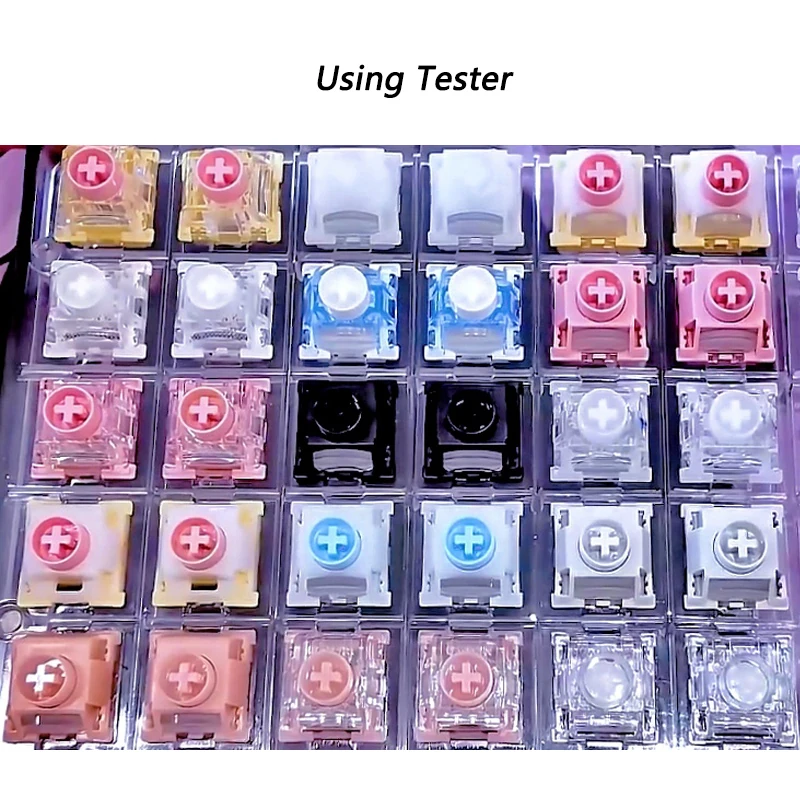
keyboard switch tester
However, it should be noted that the tester only reflects the performance of the switch itself. Due to the lack of a complete keyboard mounting plate, keycaps, and shell structure, the actual typing experience will still differ from that after a full keyboard assembly. Users can install it on a keyboard and try it out after confirming it is suitable.
Keyboard Testing Software
In addition to experiencing the feel, we also need to confirm whether the keyboard switch can be stably triggered. For this, testing software provided by some mechanical keyboard brands can be used. After installing the switches, the software displays the key status in real time, helping to detect whether the keys are actuated correctly, whether there are duplicate actuations, missed actuations, and whether multiple keys pressed simultaneously can be correctly recognized, thus determining whether the switches and keyboard input functions are working properly.
However, this type of keyboard testing software can only verify whether the mechanical keyboard switch works properly; it cannot evaluate the feel, smoothness, or sound performance. Therefore, it needs to be used in conjunction with the aforementioned keyboard switch tester to obtain more comprehensive test results.
How to Test a Mechanical Keyboard Switch Step by Step
Test the Typing Feel
In the initial test, focus on the overall pressing experience. Pay attention to the smoothness of the key presses, the stability of the switch movement, the uniformity of resistance, and the consistency of feel under different pressure levels.
Additionally, test the experience of continuous pressing. If there is no noticeable wobble or sticking, the switch movement quality is good. Since the Typing Feel directly affects long-term comfort, it is recommended to conduct multiple continuous tests before making a judgment.
Test the Operating Force
After completing the overall feel test, we can further experience the keyboard switch’s operating force. Press the keys dozens of times continuously, feeling whether the keys are easy to press and whether prolonged typing causes fatigue. Different users have different preferences for operating force; some prefer light touches, while others prefer a firmer feedback. Therefore, when testing the operating force, feel whether the force suits your needs.
Test the Travel Distance
Key travel distance affects the typing rhythm and pressing experience. During testing, focus on the pre-travel, total travel, bottoming-out feel, and cushioning. While these parameters can be found in the product specifications, it’s highly recommended to test them in real-world typing or gaming scenarios to avoid choosing a keyboard switch that doesn’t suit your usage habits.
Test the Return Performance
Excellent rebound performance allows the keyboard switch to quickly return to its initial position, ensuring smooth continuous typing. During testing, quickly and repeatedly press the same key, observing the rebound speed, the timeliness of key return, the stability of continuous typing, and the presence of lag. If the rebound performance remains consistent after multiple consecutive tests, it indicates good stability and reliability of the switch.
Test the Sound Profile
Sound profile is an important indicator for testing mechanical keyboard switches. Perform light presses, normal typing, and rapid continuous typing, observing whether the sound is clear and natural, whether the volume meets expectations, whether the sound of each key is consistent, and whether there are any unwanted noises or friction sounds. Since keycaps, mounting plates, PCBs, and casings all affect the final sound, it’s best to maintain a similar testing environment when comparing different keyboard switches to obtain more objective results.
How to Compare Different Keyboard Switch Types
After completing the basic testing of a single keyboard switch, the next step is to compare different types of switches. For most beginners, Linear, Tactile, and Clicky switches each have their own characteristics; none is inherently superior to another. The more important thing is to determine which type best suits your needs.
Linear Keyboard Switch Testing
When testing a Linear keyboard switch, focus on smoothness, tactile feedback, continuous keystroke performance, and rebound speed. Since Linear keyboard switches lack tactile feedback, the smoothness of the entire keystroke process is a crucial factor in evaluating its performance.
During testing, try continuous rapid typing to observe whether the keys maintain a consistent movement trajectory and whether they remain comfortable even after prolonged use. If the user is using it for gaming, they can also simulate frequent keystrokes to experience the stability and rebound performance under continuous triggering.
Tactile Keyboard Switch Testing
For Tactile keyboard switches, the testing focus should be on the tactile feedback itself, not just the smoothness. At this point, it’s recommended to focus on the location, clarity, and evenness of the tactile feedback, as well as the naturalness of continuous typing.
A high-quality tactile keyboard switch provides stable and consistent tactile feedback without significant changes due to varying pressure. For users who need to input large amounts of text, try typing continuously for a few minutes to observe whether the tactile feedback helps improve input confirmation and whether it causes additional fatigue.
Clicky Keyboard Switch Testing
The testing focus for Clicky keyboard switches is primarily on the consistency of sound and feedback. For this type of switch, it’s recommended to focus on whether the click sound is clear, whether the sound of different keys is consistent, whether the trigger feedback is clear, and whether prolonged typing suits personal habits.
While the click sound provides strong input feedback, the level of sound tolerance varies in different usage environments. Therefore, when testing a clicky keyboard switch, a comprehensive judgment should be made based on your actual usage scenario, rather than just focusing on the sound itself.
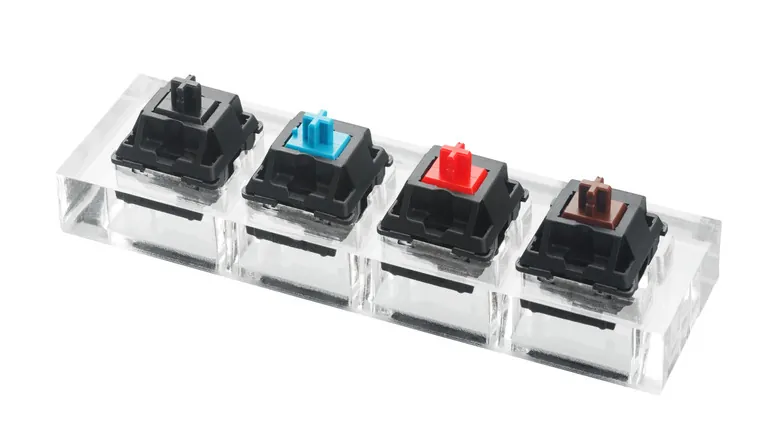
different keyboard switch types
FAQ
Q1: Why do some Mechanical Keyboard Switches feel different from what others describe?
A1: Different keyboard structures, keycap materials, installation methods, and individual typing habits all affect the actual experience. Therefore, the same switch may perform significantly differently on different keyboards.
Q2: Do I need to wear keycaps when testing a Mechanical Keyboard Switch?
A2: It is recommended to test with keycaps on. The feel, sound, and rebound of bare switches will differ from those with keycaps.
Q3: Will the feel of a Mechanical Keyboard Switch change after a period of use?
A3: Yes. With prolonged use, the switches gradually break in, and some users may find the typing smoother. However, the degree of change varies depending on the switch design and usage frequency.
Q4: Do I need to buy many different models of Mechanical Keyboard Switches for testing?
A4: As needed. For beginners, trying out several different types of switches first makes it easier to find what suits you best before further refining your choices.
Q5: A slight noise was detected during the Mechanical Keyboard Switch testing. Should it be replaced immediately?
A5: Not necessarily. If the keys trigger normally, the slight noise may be related to the installation or keyboard structure. Further inspection is recommended before deciding whether to replace it.
Conclusion
For beginners, testing keyboard switches helps understand the actual differences between different switch types, avoiding making choices based solely on specifications or online reviews. By experiencing Typing Feel, Operating Force, Travel Distance, Return Performance, and Sound Profile, a more comprehensive assessment can be made to determine if a mechanical keyboard switch meets their needs.
As keyboard switch manufacturers continue to optimize structural design, material processes, and manufacturing consistency, high-quality mechanical keyboard switches not only offer more stable performance but also provide users with a richer typing experience. For users seeking an ideal feel, combining scientific testing with actual usage needs is often more effective than simply pursuing popular products in finding a keyboard switch that truly suits their needs.