
Blog
What Is the Lightest Mechanical Keyboard Switch for Fast Typing?
With the development of office efficiency, content creation, and e-sports gaming, more and more users are paying attention to the feel of mechanical keyboard switches. Among these, “What is the lightest mechanical keyboard switch?” has become one of the most important questions for many consumers when choosing a keyboard.
However, light operating force does not mean it’s suitable for everyone. Different types of mechanical keyboard switches have different characteristics in terms of operating force, actuation distance, rebound speed, and typing experience. This article will introduce the definition, working principle, main advantages, target audience, and purchasing advice of light mechanical keyboard switches to help users find the keyboard switch that best suits their needs.
What Does “Lightest Mechanical Keyboard Switch” Mean?
A light mechanical keyboard switch refers to a mechanical switch with lower operating force and easier key presses. Unlike focusing on sound, tactile feedback, or actuation distance, “light” primarily reflects the force required for the user to press the key. For people who type a lot of text daily or use the keyboard for extended periods, this directly affects the overall typing experience.
The operating force, measured in gf (gram-force), is usually used to measure whether a mechanical keyboard switch is considered light. This refers to the pressure required to actuate a key from its resting state. Different products use different spring specifications depending on their design goals, thus varying the actuation force.
- Generally, 20gf~35gf can be considered ultra-light actuation force, requiring almost no force to actuate the key, suitable for users seeking an extremely light typing experience.
- 35gf~45gf is light actuation force, a common range for many office and gaming keyboards, achieving a good balance between easy typing and stable control.
- Above 45gf is considered medium to high actuation force, providing more noticeable resistance, suitable for users who prefer a firmer feel.
It’s important to note that while lower actuation force does make keys easier to actuate, it doesn’t necessarily mean a better experience. Too low a pressure may increase the probability of accidental keystrokes, while higher pressure provides a stronger sense of control. Therefore, when choosing a light mechanical keyboard switch, one should consider their own typing habits, finger strength, and primary usage scenarios, rather than simply pursuing the lowest actuation force.
How a Mechanical Keyboard Switch Works
Internal Structure of a Mechanical Keyboard Switch
A mechanical keyboard switch mainly consists of a stem, spring, metal contacts, and housing:
- The stem guides the key’s up-and-down movement and determines the switch’s actuation characteristics;
- The spring provides the rebound force and determines the amount of actuation force;
- The metal contacts conduct electrical signals;
- The housing secures the components and ensures stable switch operation.
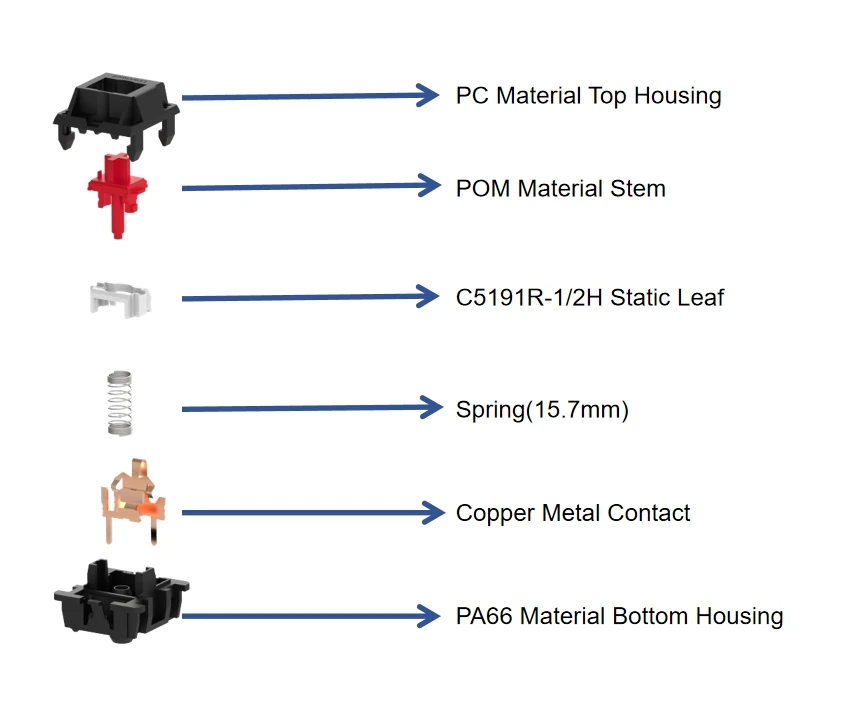
(mechanical keyboard switch structure)
When a user presses a keycap, the stem moves downwards along the guide rail, and the spring gradually compresses. When the actuation position is reached, the metal contacts make contact, establishing a circuit. The keyboard controller recognizes the key signal and immediately completes the input. When the user releases the key, the spring releases its stored elastic potential energy, quickly returning the stem to its initial position, completing the input cycle.
Because each keyboard switch has an independent structure, it can provide stable and consistent key feedback, which is a key reason why mechanical keyboards have long been popular with users.
How Operating Force Affects Typing Feel
In a mechanical keyboard switch, the spring is a crucial component determining the operating force. A lighter spring requires less force to press the key; a stronger spring requires more pressure to trigger.
Lighter springs reduce key resistance, making finger movement easier, especially when typing large amounts of text continuously. They effectively reduce the force required for each key press, thus improving overall input efficiency. Heavier springs require more force to press, but reduce the probability of accidental keystrokes and improve key control.
Operating force affects not only input speed but also keying comfort. With moderate pressure, users can maintain a stable key control while achieving a relatively fast typing speed. If the operating force is too low, although the keys are lighter, it may increase the probability of accidental keystrokes due to slight touches. Conversely, higher operating force improves key control precision but requires more finger strength for continuous typing.
In conclusion, different pressure ranges are suitable for different users, and the choice should be based on a trade-off according to actual needs.
Advantages of a Light Mechanical Keyboard Switch
Faster Typing Speed
One of the advantages of a light mechanical keyboard switch is its ability to improve continuous typing efficiency. Because each keystroke requires less force, finger movement on the keyboard is easier, and resistance is significantly reduced when pressing multiple keys consecutively.
For programmers, editors, writers, and office workers who need to type for extended periods, this lightweight operation reduces the burden of repetitive keystrokes, making typing smoother. After becoming familiar with the switch feel, users can usually maintain a faster and more stable typing speed.
Of course, typing speed is not only related to the force applied, but also closely related to the user’s typing habits and keyboard layout. Light switches provide good assistance, but it still takes some time to adapt to them to achieve their optimal effect.
Reduced Finger Fatigue
When using a keyboard for extended periods, fingers repeatedly press keys. If a large amount of force is applied over a long period, muscle fatigue can easily occur. With a light mechanical keyboard switch, the force required for each keystroke is significantly reduced, and the pressure on finger joints and muscles is relatively reduced, making it more suitable for users who need to type continuously for several hours a day.
For office workers, content creators, and students, lower key pressure helps maintain a more comfortable typing state, reduces fatigue from prolonged typing, and improves overall work efficiency.
Smooth and Responsive Typing Experience
Most light-weight keyboard switches on the market are Linear mechanical keyboard switches, characterized by a smooth movement trajectory throughout the pressing process, without noticeable tactile resistance or click feedback. This structure allows for continuous and smooth key presses and rebounds, resulting in a more natural typing rhythm, especially during high-speed continuous typing, maintaining a stable and consistent operating experience.
Furthermore, because the key movement is smoother, users can more easily develop a stable typing rhythm, making Linear keyboard switches widely popular among gamers and high-speed typists.
Choosing the Right Mechanical Keyboard Switch for Different Users
Mechanical Keyboard Switch for Office Users
Office users typically handle large amounts of documents, emails, and data daily, thus placing greater emphasis on typing comfort. Light-weight mechanical keyboard switches can reduce fatigue during continuous typing and improve overall office efficiency.
Meanwhile, office environments typically have noise restrictions, so it’s recommended to prioritize quieter Linear switches or silent versions to ensure comfortable typing while minimizing disturbance to colleagues.
Mechanical Keyboard Switch for Gamers
For esports players, fast response is a crucial factor when choosing a keyboard switch. Lighter actuation force allows players to complete consecutive keystrokes faster, offering an advantage when rapid movement, skill activation, or high-frequency operations.

However, excessively low actuation force may lead to accidental keystrokes during intense gameplay. Therefore, it’s recommended to choose an actuation force range that suits your game type, personal habits, and long-term usage experience, rather than blindly pursuing the lowest actuation force.
Mechanical Keyboard Switch for Beginners
New users of mechanical keyboards often haven’t yet developed a clear preference for their feel. At this stage, it’s advisable to start with products requiring light or medium actuation force. After adapting to the mechanical switch input method, gradually try different actuation forces and switch types. Through practical experience, users can more accurately determine their preferences and find a keyboard switch that best suits them.
Factors to Consider When Selecting a Mechanical Keyboard Switch
Operating Force
Operating force is a crucial parameter determining the typing experience and is one of the primary indicators users should consider when choosing a keyboard switch. It’s recommended to choose based on daily typing time, finger strength, and primary intended use. For extended office work, prioritize products with light operating force, while users requiring stronger control can choose switches with slightly higher actuation force for more stable tactile feedback.
Switch Type
Mechanical keyboard switches are generally categorized into three types based on their feel: Linear, Tactile, and Clicky.
- Linear keyboard switches offer smooth, unobtrusive keystrokes, suitable for users seeking smooth input and fast operation.
- Tactile keyboard switches provide clear tactile feedback during actuation, making it easier for users to perceive key presses.
- Clicky keyboard switches add crisp tactile feedback to the tactile feedback, providing a richer typing experience for users who prefer a definite tactile confirmation.
Different types of switches are suitable for different needs, such as office work, gaming, and general use. Users can choose based on their preferred feel.
Durability
High-quality mechanical keyboard switches boast a lifespan of tens of millions or even hundreds of millions of keystrokes, maintaining stable and consistent performance even under prolonged and frequent use. A longer lifespan not only extends the overall lifespan of the keyboard but also helps maintain a consistent key feel over time, which is especially important for office equipment and high-end gaming keyboards.
Sound Preference
Different keyboard switches produce noticeably different sounds during key presses. In quiet environments such as open-plan offices and libraries, low-noise switches reduce the impact on the surrounding environment. For users who prefer strong tactile feedback, Clicky switches provide a more distinct typing rhythm and tactile confirmation.
Therefore, sound performance is also an important factor affecting the user experience when choosing a mechanical keyboard switch, and should be considered in conjunction with the actual usage environment.
Conclusion
Light mechanical keyboard switches provide users with a more relaxed and efficient typing experience with lower operating force, especially suitable for long typing sessions, office work, and some gaming applications. However, different users have different needs for feel, feedback, and key pressure, so not everyone needs the “lightest switches.”
When choosing a mechanical keyboard switch, factors such as operating force, switch type, mechanical lifespan, sound performance, and actual usage scenarios should be considered. For keyboard manufacturers, choosing a keyboard switch manufacturer with independent R&D capabilities, precision manufacturing processes, and a rigorous quality management system will help create more stable, comfortable, and competitive keyboard products.