
Blog
What Makes a Mechanical Blue Keyboard Switch Different?
In mechanical keyboards, the switch directly influences the typing feel, sound, and actuation experience. Beyond mere color differences, variations in the structure of the stem, spring, contact mechanism, and click mechanism result in distinct typing sensations for the user. The mechanical blue keyboard switch is classified as a “clicky” switch, characterized primarily by a distinct tactile bump and a crisp, audible click.
When typing, users receive feedback not only through the physical sensation of actuation in their fingers but also through the audible confirmation of the keypress. This article analyzes the differences between the mechanical blue switch and other switch types—covering internal structure, actuation method, sound, feel, and use cases—to provide a better understanding of this type of switch.
What Is a Mechanical Blue Keyboard Switch?
The mechanical blue keyboard switch is a type of switch used in mechanical keyboards that triggers a circuit via a mechanical structure. It provides distinct tactile feedback and an audible click during the press, earning it the classification of a “clicky” switch.
Structurally, the mechanical Blue switch consists of a housing, stem, spring, metal contact, and a mechanical mechanism designed to produce click feedback. It is important to note that “Blue” serves primarily as a visual identifier; specifications for Blue switches vary among manufacturers. By adjusting parameters such as operating force, actuation point, travel distance, spring characteristics, and the click mechanism, different manufacturers create switches with unique feels and sounds.
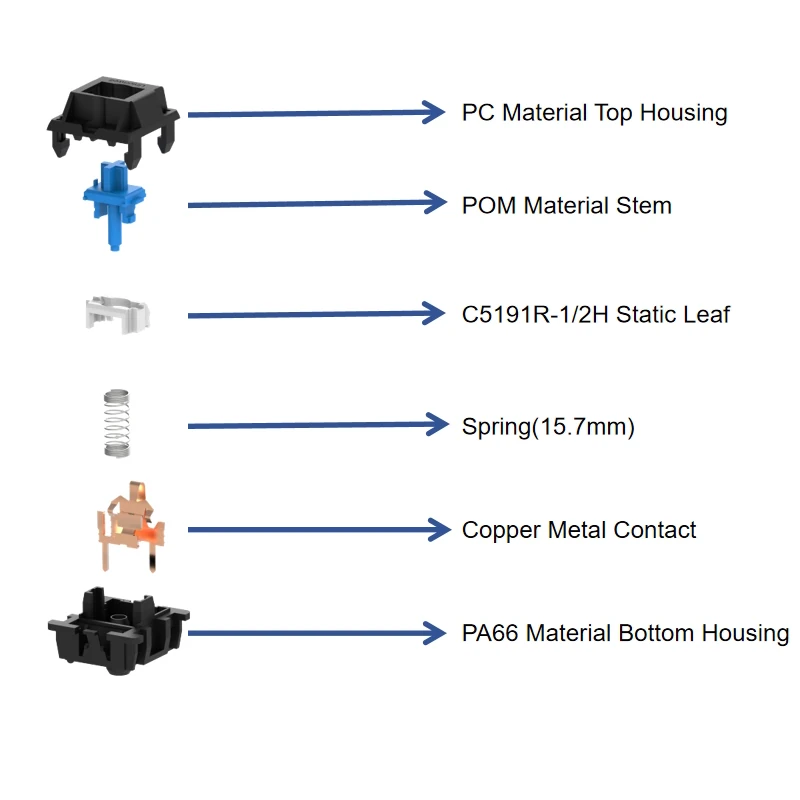
the structure of the mechanical blue keyboard switch
How Does a Blue Keyboard Switch Work?
When a user presses the keycap, the force is first transferred to the stem. The stem moves along guide rails within the housing, compressing the spring. While the spring provides resistance and return force, the movement of the stem acts upon the internal metal contact. Once the stem reaches a specific position, the contact mechanism changes state, completing the circuit actuation.
Unlike other mechanical keyboard switches, the Blue switch features a dedicated click mechanism. This mechanism triggers a rapid release action at a specific point in the stroke, creating a noticeable shift in resistance and producing an audible click. Consequently, the typing feedback from a Blue switch is not derived solely from the spring, but is the result of the combined interaction of the stem, spring, contact mechanism, and click mechanism.
What Makes Blue Keyboard Switches Clicky?
The “click” sound of mechanical Blue switches primarily stems from the mechanical release and impact of their internal click mechanisms. Common designs include the “click jacket” and the “click bar.” The click jacket generates tactile and audible feedback through the movement and release of components, whereas the click bar utilizes an elastic metal structure to store and release mechanical energy. These differing structures result in distinct sound characteristics and feedback profiles.
What Makes a Mechanical Blue Keyboard Switch Different?
The primary distinction between a mechanical Blue keyboard switch and other types of switches is its combination of pronounced tactile feedback and audible feedback.
Distinct Tactile Feedback
Tactile feedback is a core characteristic of the mechanical Blue switch. As the key is pressed, the user experiences more than just the gradually increasing resistance of the spring; there is a noticeable change in resistance at a specific point. This “tactile bump” helps the user determine whether the key has passed the critical actuation point.
However, the intensity of this feedback varies among different Blue switches. Factors such as spring force, stem profile, the click mechanism, and internal friction all influence the final force curve, leading to potentially significant differences in actual feel.
Clear Click Sound
The click sound is one of the most recognizable features of the Blue switch. It utilizes a specialized mechanical structure to produce a distinct clicking sound, allowing users to receive feedback through both touch and hearing. It is worth noting that components such as keycaps, the mounting plate, the PCB, the switch housing, and even the desk surface can alter the volume and tone of the switch’s sound.
Defined Actuation Feedback
The actuation process of the mechanical Blue switch is highly perceptible. As the stem approaches a specific position, the click mechanism generates distinct mechanical feedback; this makes it easier for the user to sense when the key has reached the actuation point, creating a clear and rhythmic typing experience.
How Does a Mechanical Blue Keyboard Switch Compare With Other Keyboard Switches?
Mechanical Blue Keyboard Switch vs. Linear Switch
Linear keyboard switches typically lack a distinct tactile bump during the downward stroke; the stem moves along a continuous path, with the spring providing the primary resistance, resulting in a smoother typing experience. In contrast, Blue keyboard switches feature a noticeable change in resistance and an audible “click” sound, providing the user with simultaneous tactile and auditory feedback.

linear keyboard switch
The difference between the two stems from their respective force curves. Linear switches emphasize continuous motion, whereas Blue switches incorporate distinct mechanical feedback at a specific point in the stroke. Users who perform rapid, repetitive keystrokes often find the smooth, continuous feel of Linear switches better suited to their habits, while those who prefer clear, distinct feedback may favor Blue switches.
Mechanical Blue Keyboard Switch vs. Tactile Switch
Both Blue and Tactile keyboard switches provide tactile feedback, but they differ significantly in their sound profiles. Tactile switches generate a “bump” sensation through the stem profile and internal contact structure, whereas Blue switches utilize a specific click mechanism to produce a distinct audible click alongside the tactile feedback. In essence, Tactile switches emphasize tactile confirmation, while “Clicky” switches emphasize both tactile and auditory confirmation.
Mechanical Blue Keyboard Switch vs. Magnetic Keyboard Switch
Mechanical Blue switches trigger the circuit through the mechanical state change of metal contacts, whereas Magnetic keyboard switches utilize a magnet and a Hall effect sensor to detect changes in the stem’s position.
Most Magnetic switches currently on the market feature a smooth, linear force profile, making them more similar to Linear switches than to Blue switches, which offer distinct tactile bumps and click feedback.
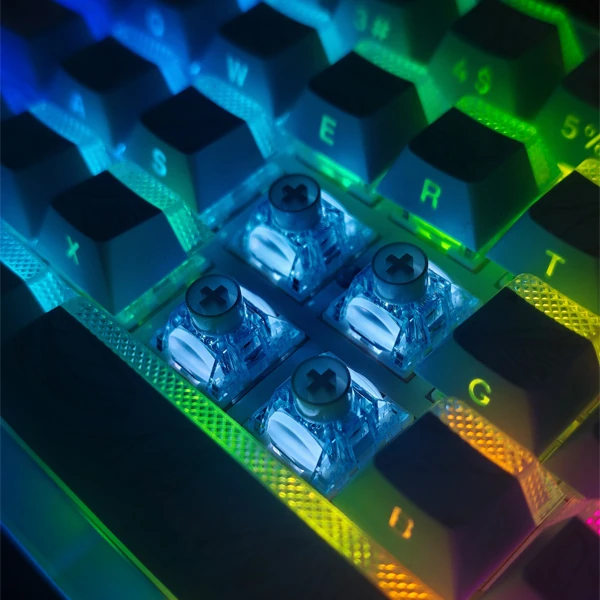
magnetic keyboard switch
However, Magnetic switches allow for adjustable actuation points based on position detection via the PCB and firmware, placing greater emphasis on positional sensing and customization. In contrast, the actuation point and tactile/click feedback of Mechanical Blue switches are determined by their physical mechanical structure, emphasizing the mechanical tactile sensation and audible feedback.
How Does a Mechanical Blue Keyboard Switch Affect the Typing Experience?
The actual experience of using a mechanical Blue keyboard switch stems from the interplay of tactile feedback, the click sound, actuation characteristics, and spring force.
Typing Feedback and Key Feel
The most distinctive aspect of the Blue switch is its clear actuation point; users feel a change in resistance at a specific position accompanied by an audible click, which helps establish a clear typing rhythm. However, the feel is not determined solely by the click mechanism; factors such as spring force, the precision fit between the stem and housing, and stem stability also influence the experience. Therefore, optimizing a keyboard switch requires controlling the entire mechanical system, not just the click mechanism.
Sound and Typing Environment
The click sound of a mechanical Blue switch is a crucial factor to consider. In a private workspace, the crisp click can enhance typing feedback and serve as a key reason for choosing the switch. However, in environments like open-plan offices, meeting rooms, libraries, or coworking spaces, the constant clicking can disturb others; consequently, using them in noise-sensitive public areas is generally not recommended.
Is a Mechanical Blue Keyboard Switch Suitable for Gaming?
Mechanical Blue switches can be used in gaming keyboards, though response speed depends on factors such as the actuation point, switch travel, PCB scanning, firmware, and the overall input chain. While Blue switches feature a distinct mechanical actuation mechanism and provide tactile/click feedback, this does not inherently make them faster or slower than other switch types.
For games requiring rapid, repetitive actions, some users may prioritize a shorter actuation distance, lighter operating force, and smooth, continuous key presses. Linear switches, with their smooth, consistent travel, may better suit these needs, whereas users who prefer distinct feedback are more likely to favor Blue switches.
Who Should Choose a Mechanical Blue Keyboard Switch?
Mechanical Blue switches are best suited for users who appreciate distinct tactile feedback, a crisp click sound, and clear actuation feedback. For tasks like text entry, general office work, or for those who simply enjoy a “clicky” typing experience, Blue switches offer a satisfying sense of key actuation confirmation. Blue switches are not recommended for users who frequently work in open-plan offices, shared work-spaces, or other environments where minimizing keyboard noise is necessary; instead, quieter tactile or linear switches should be considered.
Conclusion
The core characteristics of mechanical Blue switches can be summarized in three aspects: distinct tactile feedback, a crisp clicking sound, and clear actuation feedback. Structurally, the click mechanism is what distinguishes Blue switches from linear and tactile switches, enabling them to provide both pronounced mechanical and auditory feedback.
Therefore, the choice of a keyboard switch should not be based solely on the switch color. Manufacturers and purchasers should evaluate keyboard switch factors such as operating force, actuation characteristics, travel distance, tactile profile, click mechanism, mechanical lifespan, and product consistency. End-users, meanwhile, should make their selection by comprehensively considering typing feel, noise levels, gaming requirements, and their specific usage environment.