
Blog
Are Mechanical Keyboard Switches Compatible with Optical Keyboards?
As the mechanical keyboard market continues to develop, more and more users are adjusting their key feel, tactile feedback, and sound performance by replacing their keyboard switches. However, a rather unique issue has recently arisen: Can you put mechanical switches on an optical keyboard?
It turns out that this is currently impossible. A mechanical keyboard switch that appears to be similar in size and can even be physically inserted into the keyboard will not function properly on an optical keyboard. This article will analyze why mechanical keyboard switches and optical keyboard switches cannot be directly interchanged, starting from the working principle of mechanical keyboard switches, the detection method of optical switches, PCB structure, and actual modification conditions, and what users should do if they really intend to replace their keyboard switches.
Why You Can’t Put Mechanical Keyboard Switches on an Optical Keyboard?
First, it’s important to clarify that the key difference between mechanical and optical keyboard switches lies in their signal connection methods:
- Mechanical keyboard switches rely on metal contacts to connect or disconnect the circuit. When a keycap is pressed, the stem moves and changes the contact state, and the PCB identifies the key signal through a scanning circuit.
- Optical keyboards detect changes in the light path using an optical sensor. As the stem moves, it alters the light flow, and the sensor determines whether a key is actuated.
While both can have similar structures or input feel, their core actuation mechanisms remain unchanged. For a mechanical keyboard switch to be installed in an optical keyboard, several key factors must be met:
- It must have the same actuation method, and the PCB must support mechanical contact signals;
- The PCB structure, switch mount type, and pin layout must be perfectly matched;
- The bottom structure of the switch must be able to cooperate with the optical sensor to complete light path detection, correctly blocking or altering the optical path;
- The PCB, sensor, controller, and firmware must support the new input method.
In conclusion, similar dimensions at most indicate potential mechanical compatibility, but do not guarantee that the switches will actuate correctly and transmit signals.
How Mechanical Keyboard Switches and Optical Switches Detect Key Presses
How Mechanical Keyboard Switches Send a Key Signal
Mechanical keyboard switches primarily change the electrical connection state through mechanical movement. When a keycap is pressed, the mechanical keyboard switch’s stem moves down along the housing rail and compresses the spring, causing the internal metal contact to make or break contact. The PCB then scans the state, and the controller recognizes the key input.
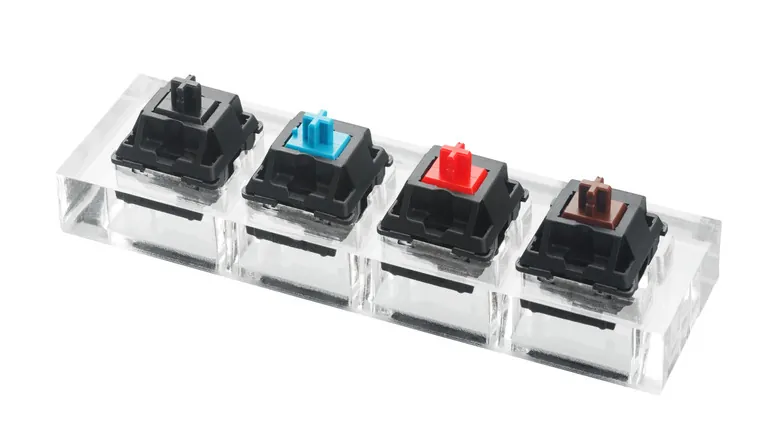
mechanical keyboard switch
The complete operation of the keyboard switch requires the coordinated work of the stem, spring, housing, metal contact, and PCB contact pins. The stem transmits the pressing force, the spring provides the rebound, the housing is responsible for positioning the movement, and the contact completes the electrical connection.
In summary, replacing mechanical switches cannot be based solely on appearance and size; it must match the PCB’s detection method. Even if the switch can be mounted on the plate, if the metal contact cannot connect correctly to the PCB, a key signal cannot be output properly.
How Optical Detection Works in a Keyboard
The working principle of an optical keyboard differs significantly from that of a mechanical keyboard switch. It primarily detects key presses through an optical sensor and a light path. When a keycap is pressed, the optical keyboard switch’s stem moves, changing the optical path. The sensor captures this change in light signal, which is then processed and recognized by the PCB and controller.
From a mechanical perspective, the Optical Switch also uses Stem, Spring, and Housing, and can also provide switches with different feel types such as Linear keyboard switch, Tactile keyboard switch, or Clicky keyboard switch. Therefore, its appearance and user experience are indeed similar to the Mechanical Keyboard Switch.
However, their signal generation methods differ greatly. A complete optical detection system consists of an optical sensor, light path, PCB circuit, switch stem structure, and controller. Therefore, even if a mechanical keyboard switch were the same size, it could not achieve the optical triggering function of an optical keyboard switch.
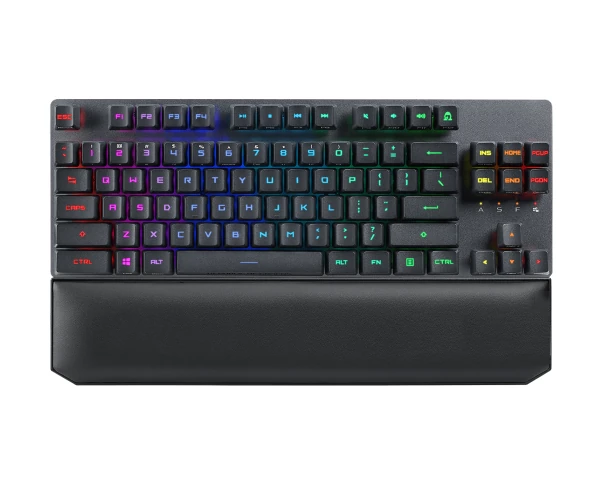
optical keyboard
Advantages and Disadvantages of Mechanical Keyboard Switches
Advantages
Mature Mechanical Contact Structure: Mechanical keyboard switches use Metal Contact for input detection. This structure has been validated through long-term application, and its manufacturing process, structural design, and testing methods are relatively mature. For keyboard manufacturers, this also makes it easier to establish a complete supply chain and production system.
A Wide Variety of Keyboard Switch Types Available: Currently, mechanical keyboard switches offer products with different trigger feedbacks such as Linear, Tactile, and Clicky. Users can also obtain different operating forces, travel, and sound performances through different combinations of Spring, Stem, and Housing.
Relatively Clear Compatibility Logic: The compatibility of mechanical switches can usually be determined through PCB design, Pin Layout, Mounting Structure, switch dimensions, and electrical parameters. If the PCB supports the corresponding mechanical switch specifications, and the Pin Layout, mounting structure, and dimensions are compatible, then changing the switch does not require changing the entire detection system.
Main Limitations
Reliance on Mechanical Contacts: Mechanical keyboard switches use metal contacts for circuit switching, resulting in numerous repetitive actions over long-term use. Contact materials, structural design, and manufacturing precision all affect long-term reliability. Mechanical lifespan and contact stability are key indicators to consider when choosing a switch.
Contacts May Be Affected by Environmental Factors: The mechanical contact structure can be affected by dust, contamination, oxidation, and structural misalignment. Abnormalities in the contact area can cause unstable triggering, abnormal contact, or decreased input consistency. Therefore, housing fit, stem movement, contact position, and spring parameters all need to maintain high consistency.
Mechanical Switches Are Not Completely Interchangeable: While mechanical keyboard switches have achieved significant standardization, this does not mean all switches are interchangeable. Different products may have 3-pin or 5-pin switches, different positioning post structures, different bottom sizes, different housing designs, and different PCB compatibility requirements. Therefore, users still need to check the specific keyboard’s PCB and plate specifications when replacing switches.
Advantages and Disadvantages of Optical Keyboard Switches
Main Advantages
Utilizes a Non-Traditional Mechanical Contact Detection Method: Optical switches primarily utilize optical detection to determine key presses, eliminating the need for traditional mechanical contacts for signal switching. Their trigger signal originates from changes in the optical path, leading to a different technological approach in structure and system design compared to mechanical keyboard switches.
Unique Detection Structure: The triggering process of an optical switch requires the coordinated operation of the switch core, light path, optical sensor, PCB, and controller. Therefore, manufacturers can adjust the switch’s trigger structure and detection method according to specific product designs, but this also means the switch itself cannot operate independently of the overall keyboard platform.
Suitable for Specific Keyboard Platforms: If the keyboard uses an optical PCB, optical sensor, and corresponding controller from the design stage, the optical switch can be matched with the entire system. In this case, the switch structure, optical path position, sensor detection range, and firmware are all designed around the same input solution, meeting the specific requirements of the keyboard product.
Suitable for Specific Keyboard Platforms: If the keyboard uses an optical PCB, optical sensor, and corresponding controller from the design stage, the optical switch can be integrated with the entire system. In this case, the switch structure, optical path position, sensor detection range, and firmware are all designed around the same input solution, meeting the needs of the specific keyboard product.
Key Limitations
Platform compatibility is limited: Optical switches typically require specific PCBs, sensors, controllers, and detection structures. Therefore, when selecting an optical switch, users cannot focus solely on pin layout as they would with some mechanical keyboard switches. Different optical keyboard platforms may also use different detection structures, meaning an optical switch suitable for one platform may not be compatible with another.
Replacing a switch requires consideration of system architecture: When replacing an optical switch, it’s necessary to confirm the switch dimensions, bottom structure, stem movement range, optical detection position, and PCB design. Furthermore, the optical sensor needs to accurately detect changes in the optical path at specific locations. If the new switch’s stem structure, light-blocking components, or movement distance differ from the original design, it may lead to abnormal trigger points or even failure to trigger.

using optical keyboard
Limited DIY Modification Space: If a user wants to install a mechanical keyboard switch into an optical keyboard, the issues involved go far beyond physical installation:
- Mechanical matching between the mechanical switch and the plate;
- Electrical connection between the metal contacts and the PCB;
- Addressing the original optical sensor’s detection logic; and finally, ensuring the controller and firmware can recognize the new input method.
If the PCB lacks the corresponding contact circuitry for the mechanical switch, the user may need to redesign the PCB. If the controller and firmware are also developed specifically for optical detection, further signal recognition issues will require handling. This clearly goes beyond simple switch replacement and approaches system-level keyboard hardware modification.
Therefore, there is no simple “better” relationship between optical switches and mechanical keyboard switches. They actually correspond to different detection architectures. For users, the most important thing is to choose the correct switch based on the keyboard PCB, switch type, usage requirements, and compatibility.
Conclusion
Mechanical keyboard switches cannot be directly installed or function properly on optical keyboards. If the original keyboard was designed for optical detection, then directly installing a mechanical keyboard switch would not be a wise move.
For keyboard switch manufacturers and keyboard brands, only by simultaneously optimizing the mechanical structure of the switches, electrical connections, PCB fit, and mass production consistency can a keyboard switch maintain stable input performance in different application scenarios and provide users with more flexible and reliable product options.