
Blog
What Is a Mechanical Keyboard Switch and How Does It Work?
In recent years, mechanical keyboards have gradually become an important input device for consumers. Whether in professional esports arenas, corporate offices, or personal desktop setups, mechanical keyboards have gained widespread recognition for their excellent feel and durability.
The core component that determines the performance of a mechanical keyboard is the mechanical keyboard switch. Although many people use mechanical keyboards daily, they are not familiar with the internal structure and working principle of the mechanical keyboard switch. This article will comprehensively analyze the definition, composition, working principle, and common types of mechanical keyboard switches to help readers gain a deeper understanding of this core keyboard component.
What Is a Mechanical Keyboard Switch?
Understanding the Basic Definition of a Mechanical Keyboard Switch
Unlike many input devices that use a shared circuit design, each mechanical keyboard switch on a mechanical keyboard corresponds to an independent switching unit. When a user presses a key, the switch independently triggers a signal and transmits the input command to the computer.
Membrane keyboards, on the other hand, mainly rely on a three-layer membrane circuit structure. When a key is pressed, the upper and lower conductive layers make contact, thereby generating an input signal. This design has lower manufacturing costs, but the shared circuitry between keys can lead to issues like decreased tactile feedback and inconsistent actuation after prolonged use.
In contrast, a mechanical keyboard switch features an independent mechanical structure for each key, including the switch itself, spring, metal contacts, and housing. When a user presses a key, the mechanical mechanism independently completes the entire actuation process, providing a more stable and precise input experience, forming the foundation for high-precision input on mechanical keyboards.
Why Mechanical Keyboard Switches Are Popular
Mechanical keyboard switches offer significant advantages in several aspects:
- Richer Tactile Feedback: Different switch structures provide various tactile feedbacks, such as linear, tactile, or click feedback, to meet the needs of different users.
- Higher Input Precision: The independent actuation mechanism ensures consistent actuation performance for each key, reducing accidental and missed keystrokes.
- Excellent Lifespan: Many high-quality mechanical switches have a lifespan of 80 million or even 100 million keystrokes or more, far exceeding that of ordinary input devices.
- Support for Highly Customizable Input Users can choose different switches, keycaps, switch lubrication solutions, and custom accessories to create a personalized input experience.
Therefore, mechanical keyboard switches are widely used in various scenarios such as e-sports, office work, programming, content creation, and professional input.
Main Components of a Mechanical Keyboard Switch
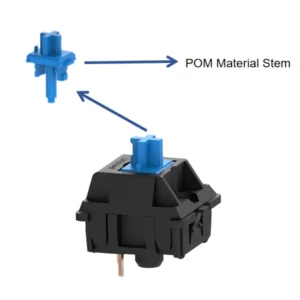
Stem
The stem is the most crucial component of a mechanical keyboard switch. When a user presses a keycap, the stem moves up and down along the guide rail, actuating the internal trigger mechanism. Its shape and structural design directly determine the feel of the switch.
Spring
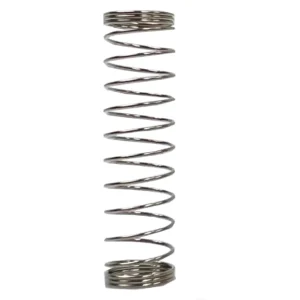
The spring provides the keyboard switch’s rebound force. When a user presses a key, the spring is compressed; after release, the spring pushes the stem back to its initial position. Its length, wire diameter, and material all affect the switch’s actuation force, a crucial factor in determining the key feel.
Metal Contacts
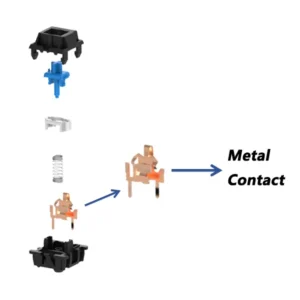
Metal contacts are responsible for conducting electrical signals. When the stem moves to the actuation point, the metal contacts make contact, closing the circuit, allowing the keyboard PCB to recognize the input signal. The contact material and manufacturing precision directly affect the switch’s lifespan and stability, a critical aspect influencing product quality.
Top Housing and Bottom Housing
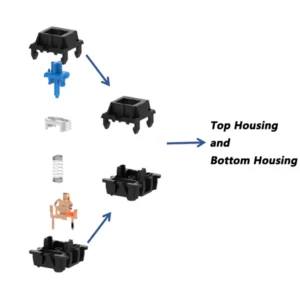
The top and bottom housings together form the switch housing, their main function being to secure internal components, protect the moving parts, and maintain overall structural stability.
How Does a Mechanical Keyboard Switch Work?
Mechanical Keyboard Switch Actuation Process
The mechanical keyboard switch operates primarily as follows:
- When a keycap is pressed, the stem moves downwards, and the spring is gradually compressed;
- When the stem reaches the designated position (trigger point), the metal contacts make contact, closing the circuit;
- The PCB detects the signal change, and the controller converts the signal into keycode information, which the computer then recognizes as the corresponding character or command;
- When the user releases the key, the spring releases its stored energy, and the stem returns to its initial position;
- The contacts separate, and the input process ends.
This process typically takes only a few milliseconds to complete and is crucial for the rapid actuation of the mechanical switch.
Actuation Point vs. Bottom-Out Point
Many new users confuse actuation point and bottom-out point, but they are completely different:
- Actuation Point refers to the position where a key successfully generates an input signal.
- Bottom-Out Point is the position where the key is fully depressed.
Taking common mechanical switches as an example, their actuation point might be 2.0mm, while their total travel reaches 4.0mm. This means users don’t need to press the key all the way down to complete the input, improving input efficiency by controlling the key depth.
Why Mechanical Keyboard Switches Feel More Responsive
Mechanical keyboard switches have a clearer actuation mechanism, a more precise actuation position, and shorter intervals between consecutive inputs. Precise actuation points help users build better muscle memory. For FPS gamers, this means faster response times; for office users, it means higher input efficiency and less fatigue.
Different Types of Mechanical Keyboard Switch
Linear Mechanical Keyboard Switch
Linear keyboard switches offer no tactile feedback and produce no clicking sound during the entire typing process. The most representative linear switches currently include the Mechanical Red Switch and Mechanical Black Switch.
Their biggest difference lies in the actuation force. The Mechanical Red Switch has a lighter actuation force, making it easier to press and ideal for extended use. The Mechanical Black Switch has a higher actuation force, providing stronger control and effectively reducing accidental presses. Due to their smooth movement, they are the most popular switch type among many gamers.
Tactile Mechanical Keyboard Switch
Tactile keyboard switches offer slight tactile feedback, allowing users to clearly feel an actuation point during the press. A representative product is the Mechanical Brown Switch.
Brown switches retain some feedback without producing a noticeable clicking sound, making them a common choice for many office users and writers. For users who want a good typing experience and a quiet environment, brown switches offer a good balance.
Clicky Mechanical Keyboard Switch
The Clicky Keyboard Switch boasts the most distinctive feedback characteristic; its internal structure produces a crisp click sound upon activation. The Mechanical Blue Switch is the most classic Clicky switch.
Blue switches offer a strong tactile bump and clear sound feedback, making them popular among some typing enthusiasts. However, it’s important to note that blue switches generate significant noise during continuous typing, which can easily disturb others in environments such as open-plan offices, libraries, and dormitories. Therefore, their use in public places or office environments is not recommended.
Advantages of Mechanical Keyboard Switch Technology
Consistent Typing Experience
Because each key has an independent structure, they can maintain a consistent triggering experience. Regardless of which key is pressed, the user receives nearly identical feedback. This is especially important for programmers, editors, and professional gamers, effectively reducing accidental keystrokes and improving work efficiency.
Customization Possibilities
The customized keyboard market has developed rapidly in recent years, with many mechanical keyboards now supporting hot-swappable designs. Users can replace switches without soldering, optimize smoothness by lubricating the switches, and adjust sound performance by changing keycaps. This high degree of customization is a key reason for the market popularity of mechanical keyboard switches.

Conclusion
The mechanical keyboard switch is the core component that enables the input function of a mechanical keyboard. It is responsible for triggering key signals and determines the keyboard’s feel, sound characteristics, and overall typing experience.
Whether you are a gamer, office user, or keyboard enthusiast, understanding its working principles will help you choose a product that better suits your needs. As keyboard switch manufacturers continue to drive innovation in materials, structure, and manufacturing processes, mechanical keyboard switches will maintain strong growth momentum and bring users a richer and more personalized input experience.