
Blog
What Is the Difference Between Mechanical Keyboard Switch Types?
In recent years, mechanical keyboards have experienced rapid growth in the e-sports, office, and custom keyboard markets. As users’ demands for input experience continue to increase, more and more people are paying attention to keyboard switches. However, for users new to mechanical keyboards, understanding the differences between various keyboard switches is a crucial question.
In fact, different keyboard switches exhibit significant differences in appearance, color, actuation force, actuation distance, sound feedback, and tactile feedback. This article will delve into the differences between various mechanical keyboard switches from multiple perspectives to help you find the most suitable switch solution for different usage scenarios.
Understanding Different Keyboard Switch Types
Why Keyboard Switches Are Not All the Same
The core reason why mechanical keyboards can provide such a diverse input experience is that each key has an independent keyboard switch. Each key on a mechanical keyboard relies on an independent switch to trigger a signal, so the differences between different switches are directly perceived by the user.

From an appearance perspective, most keyboard switches consist of a top cover, base, switch stem, spring, and metal contacts, exhibiting a similar structure. However, the key to the feel actually lies in the stem structure design, spring force, and contact actuation method.
Different stems affect the resistance changes during pressing; different spring specifications affect the amount of force required; and different actuation structures determine whether a tactile bump and click sound are produced. Therefore, even if the switches look similar, the actual experience can be quite different.
Currently, the market mainly divides keyboard switches into three categories: Linear Keyboard Switch, Tactile Keyboard Switch, and Clicky Keyboard Switch. The biggest differences between the three lie in the feedback method, sound performance, and actuation experience during pressing.
Common Keyboard Switch Categories
Linear Keyboard Switch: Characterized by no noticeable resistance change during pressing, the switch moves linearly up and down, resulting in a smooth and fluid overall feel.
Tactile Keyboard Switch: Characterized by a slight change in resistance near the actuation point, allowing the user to perceive that the key has been actuated.
Clicky Keyboard Switch: In addition to tactile feedback, it also produces a clear click sound, providing the user with stronger input feedback.
Comparing Keyboard Switch Appearance
Different Keyboard Switch Colors and Their Meanings
Many users new to mechanical keyboards may think that switch colors are just a difference in appearance, but in reality, color has gradually become one of the standard ways in the industry to distinguish switch characteristics: Red Switch usually represents a light-actuation linear switch, Black Switch usually represents a heavy-actuation linear switch, Brown Switch usually represents a light-tactile switch, and Blue Switch usually represents a tactile switch.
This helps users quickly determine the approximate type of switch. Although there may be some differences between different brands, color remains one of the most direct ways for consumers to identify the type of keyboard switch.
Can You Identify a Keyboard Switch by Appearance Alone?
Within the same brand system, identifying the type of keyboard switch by color is usually highly accurate. However, it should be noted that different brands may have different color systems. In addition to red, black, brown, and blue switches, there are also silver, yellow, and other products on the market.
Therefore, relying solely on color cannot fully determine a keyboard switch’s performance. It’s best to consider product specifications such as operating force, actuation distance, total travel, and feel descriptions.
Comparing Keyboard Switch Operating Force
What Is Keyboard Switch Operating Force?
Operating force is a crucial indicator of a keyboard switch’s feel. It represents the amount of force required to press a key, typically expressed in grams (gf) (e.g., a 45gf switch requires approximately 45 grams of force to actuate).
This parameter directly impacts user comfort. Switches with lower operating force are easier to press, while those with higher operating force provide a more solid feedback. Therefore, different users often have distinct preferences for operating force.
Light Force vs Heavy Force Keyboard Switch
Lighter operating force switches reduce fatigue during extended typing sessions. For example, Mechanical Red Switches typically employ a lighter operating force design. When engaging in continuous gaming or prolonged text input, users require less finger pressure, resulting in greater comfort.

Conversely, Mechanical Black Switches typically employ a more forceful design. Because they require greater pressure to actuate, they have a relatively lower probability of accidental keystrokes. For users who prefer a firmer feel, this provides a more stable and substantial typing experience.
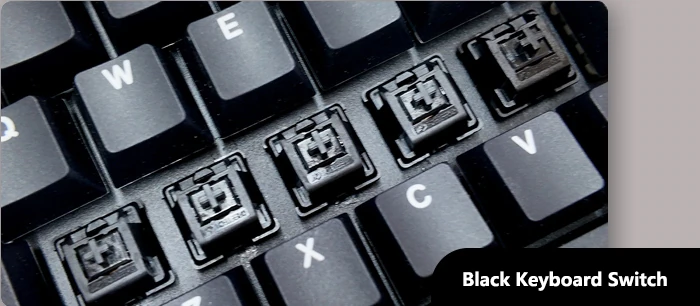
Essentially, neither is inherently superior; the final choice depends on the user’s individual habits.
How Operating Force Affects Gaming and Typing
Gamers often prioritize rapid response, so many esports users tend to choose keyboard switches with lighter operating force, reducing physical exertion during continuous operation and improving efficiency. This advantage is particularly pronounced in MOBA, FPS, and RTS games.
On the other hand, writers prioritize input stability. During extended typing sessions, adequate feedback helps reduce accidental keystrokes and improve input accuracy. Therefore, some office users may prefer switches with slightly greater operating force.
Comparing Keyboard Switch Feel and Feedback
Linear Keyboard Switch Feel Characteristics
The biggest characteristic of a linear keyboard switch is its smoothness; there is no noticeable change in resistance throughout the entire pressing process. Its axis moves linearly along a fixed track, providing a relatively consistent feel from the start of the press to bottoming out.
Both the Mechanical Red Switch and Mechanical Black Switch are linear keyboard switches. Neither has a tactile bump or click sound. This makes the pressing action smoother, making it popular among gamers.
Tactile Keyboard Switch Feel Characteristics
Tactile keyboard switches provide a slight tactile bump near the actuation point. Users can clearly feel a slight change in resistance during the press, indicating that the key has been actuated.
The Mechanical Brown Switch is one such example. Compared to linear switches, it provides more tactile confirmation. However, compared to click switches, its sound is relatively restrained. Therefore, some users consider it an “all-around” keyboard switch suitable for both office work and gaming.
Clicky Keyboard Switch Feel Characteristics
Clicky keyboard switches offer the strongest input feedback. Besides a distinct tactile bump, their internal structure produces a clear click sound, with the Mechanical Blue Switch being the most typical example. Each press is accompanied by a crisp, loud sound, providing users with a strong sense of input confirmation, making it popular among mechanical keyboard enthusiasts.
However, due to its relatively loud sound, the Mechanical Blue Switch is not suitable for use in open-plan offices or public places.
Comparing Keyboard Switch Travel Distance
Pre-Travel and Total Travel Explained
When understanding keyboard switches, users will encounter two important parameters: Pre-Travel and Total Travel. Pre-Travel refers to the distance a key travels from the initial press to the completion of the actuation, while Total Travel refers to the maximum distance a key can travel from top to bottom.
For example, a certain switch has a total travel of 4.0mm and an actuation travel of 2.0mm. This means that the user doesn’t need to press all the way down; pressing just 2.0mm is enough to trigger the signal. The remaining 2.0mm is the buffer travel, reducing the need to bottom out with each press.
How Travel Distance Influences Typing Experience
Theoretically, a shorter actuation travel results in a faster response time, helping users complete input actions earlier. This is attractive to gamers who prioritize fast input.
A longer total travel provides more complete keystroke feedback, allowing users to feel a more responsive key travel, enhancing the typing rhythm for some users.
Therefore, there is no single standard for travel parameters. Gamers may focus more on actuation travel, while office users may prioritize the overall key travel experience. Choosing the travel parameters that suit your needs is most important.
FAQ
Q1. Does the color of the keyboard switches indicate product quality?
A1. No. Color is primarily used to distinguish different types of keyboard switches and their tactile characteristics, not quality levels.
Q2. Do keyboard switches of the same color from different brands always feel the same?
A2. Not necessarily. Even with the same color, different brands may have differences in structural design and parameter settings.
Q3. Does the actuation speed of the keyboard switch affect gaming performance?
A3. Yes. In games requiring frequent input, actuation characteristics and rebound speed affect operational efficiency and the overall feel.
Q4. Can the keyboard switch be replaced separately without replacing the entire keyboard?
A4. If the keyboard supports hot-swapping, users can replace the keyboard switch directly without replacing the entire keyboard.
Q5. When buying a mechanical keyboard for the first time, which switch parameters should a beginner prioritize?
A5. It is recommended to focus on the actuation force, tactile feel, sound performance, and usage scenarios, rather than just the switch color.
Conclusion
Different mechanical keyboard switches exhibit significant differences in multiple dimensions, including actuation force, actuation distance, total travel, sound feedback, and tactile feel. These differences ultimately determine the user’s daily typing experience.
For mechanical keyboard enthusiasts, no single keyboard switch is suitable for everyone. Understanding the differences between various switch types and choosing one based on personal usage habits, work environment, and typing needs is key to achieving the ideal experience. It is hoped that as keyboard switch manufacturers continue to drive structural innovation and performance optimization, the future mechanical keyboard market will offer users a wider range of diverse and personalized choices.